

Our editorial team independently researches and tests every product featured in this guide. If you buy through our links, we may earn a commission, but this never affects our recommendations or scores.
The average worker spends 18 hours a week in meetings. I’ve certainly blown past that number across both Zoom and Microsoft Teams—running external client calls, internal team standups, interviews, webinars, and hybrid sessions. Long enough to know what good meeting software looks like when it works, and how much it costs you when it doesn’t. Pick the wrong one, and those hours quietly fill up with delays, context-switching, and unnecessary friction. I’ve tested both platforms extensively over the past year—everything from a solo freelancer setup to a 15-person agency workflow. This Zoom vs Microsoft Teams comparison breaks down exactly where each platform wins, where they fall short, and which one you should choose for your team in 2026.
Quick Picks: Best Video Conferencing Tools in 2026
- Best for External Client Calls & Webinars: Zoom – $14.16/user/month (annual), consistently better audio/video on weaker networks
- Best for Internal Collaboration & Microsoft 365 Users: Microsoft Teams – $4/user/month (annual), deep integration with Word, Excel, and Outlook
- Best Free Option: Both – Zoom: 40-min group meetings, 100 participants; Teams: 60-min group meetings, 100 participants
- Best AI Features: Zoom AI Companion (included) vs Teams Copilot ($21/user/month extra)
- Best for Freelancers & Small Teams: Zoom – simpler, faster, more guest-friendly
Table of Contents
- How I Tested These Platforms
- Scoring Criteria
- Comparison Table
- Zoom Review – Best for External Calls & Simplicity
- Microsoft Teams Review – Best for Internal Collaboration
- Head-to-Head: Side-by-Side Results
- Frequently Asked Questions
- Final Verdict
How I Tested These Platforms
Testing date: March – June 2026
I’ve been using both Zoom and Microsoft Teams as my primary meeting platforms across multiple scenarios: external client calls, internal team meetings, file collaboration, mobile joins from weak WiFi connections, and AI-powered meeting summaries. I tested the free tiers, paid Pro/ Essentials plans, and evaluated AI features across both platforms.
For context, I also compared against Google Meet and Slack’s huddle feature in select scenarios. I tracked meeting quality, guest experience, collaboration depth, and overall value for money.
Scoring Criteria
| Criteria | Weight | What I Measured |
|---|---|---|
| Meeting Quality & Reliability | 25% | Audio/video consistency, especially on weaker networks |
| Ease of Use & Guest Experience | 20% | Join friction, interface intuitiveness, mobile experience |
| Collaboration Features | 15% | File sharing, whiteboarding, chat, and document co-editing |
| AI & Productivity Features | 15% | Meeting summaries, action items, and AI assistant capabilities |
| Pricing & Value | 15% | Cost per user, features included, and overall ROI |
| Integrations & Ecosystem | 10% | Third-party integrations and native ecosystem depth |
Zoom vs Microsoft Teams: Comparison Table
| Feature | Zoom (Workplace Pro) | Microsoft Teams (Essentials) |
|---|---|---|
| G2 Rating | 4.5/5 ⭐ | 4.4/5 ⭐ |
| Starting Price (Annual) | $13.33–$14.16/user/month | $4/user/month |
| Free Plan | 40-min group meetings, 100 participants | 60-min group meetings, 100 participants |
| Meeting Duration (Paid) | 30 hours | 30 hours |
| Max Participants (Paid) | 100–300+ (plan dependent) | 300 (Essentials) |
| AI Features | AI Companion included on paid plans | Copilot requires $21/user/month add-on |
| Best For | External calls, interviews, webinars, client meetings | Internal collaboration, document-centric teams, Microsoft 365 users |
| Guest Experience | Very smooth, minimal friction | More steps, identity verification required |
| Collaboration Depth | Meeting-first, focused workflows | Workspace-first with Word, Excel, OneDrive, SharePoint |
| Breakout Rooms | Very easy to manage, smooth user flow | Available but more complex to set up |
Prices can change. Check official websites for current plans. Microsoft 365 Business Basic ($6–$7/user/month) and Business Standard ($12.50–$14/user/month) include Teams plus Office apps.
Zoom Review – Best for External Calls & Simplicity
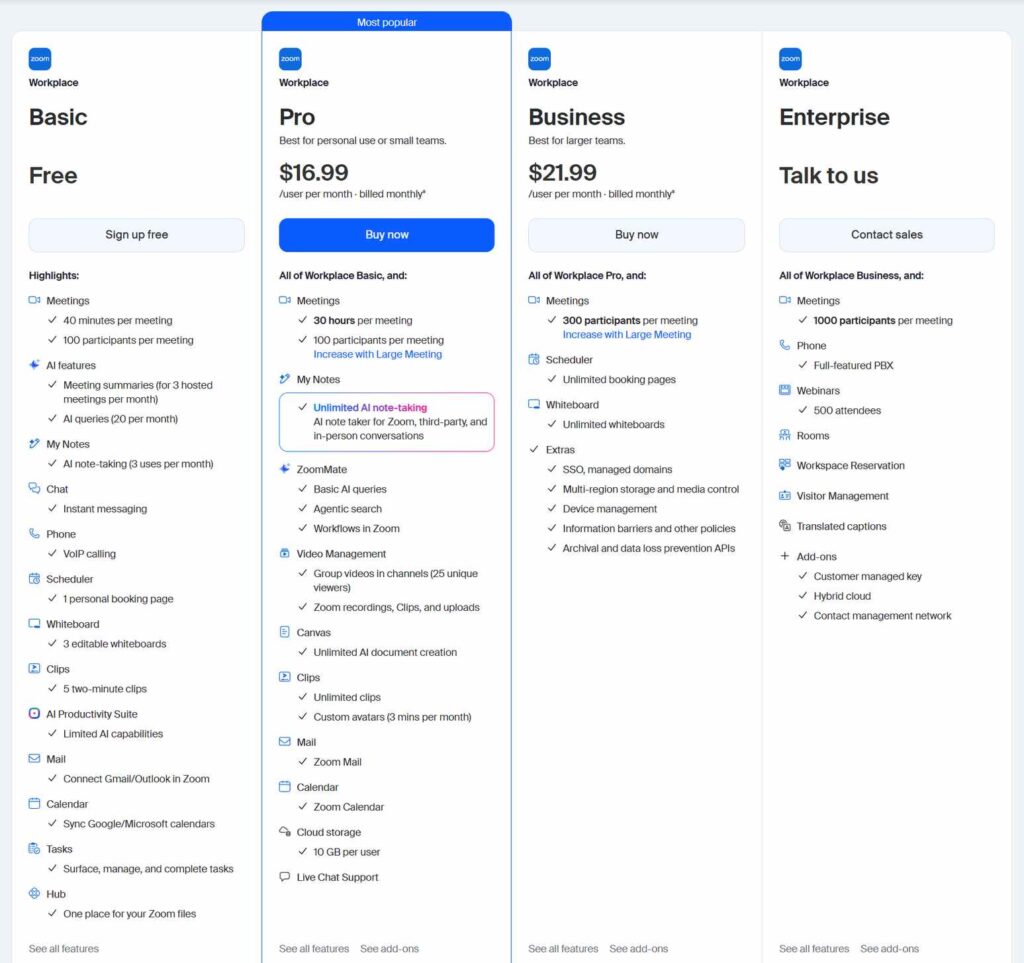
Zoom has been my go-to for client calls since 2020. It’s the platform I trust when I need to make a good impression with an external guest. The experience is consistently smooth, and the learning curve is practically nonexistent.
What I Liked
Meeting quality is consistently better. Zoom delivers more consistent audio and video, especially on weaker networks. I’ve taken Zoom calls from coffee shops, airports, and hotel rooms, and the connection has held up remarkably well. Teams can be reliable too, but the experience varies more based on organizational settings.
The guest experience is exceptional. External participants can join a Zoom call with almost zero friction. No account creation, no identity verification—just click the link and you’re in. For client-facing work, this is a massive advantage. I’ve had clients tell me they appreciate how easy Zoom is compared to other platforms.

Breakout rooms are effortless. In my experience, Zoom’s breakout rooms are very easy to manage with a smooth user flow. I’ve run workshops with 20+ participants split into 5 groups, and the process was seamless. Teams has breakout rooms too, but they’re slightly more complex to set up.
AI Companion is included and powerful. Zoom AI Companion creates meeting summaries, action items, helps with in-meeting chats, and offers stronger templating and agentic features on paid tiers. After a meeting concludes, it automatically generates a structured summary capturing key discussion points, decisions, and action items without requiring a manual note-taker. AI Companion has also expanded to Workvivo, Zoom Phone, and the Zoom Workplace app.
Clean, readable transcripts. Zoom produces clean, readable transcripts with helpful timestamps that are easy to access and share. I’ve used these extensively for client meeting follow-ups and internal documentation.
Strong third-party integrations. Zoom integrates broadly across platforms including Notion, Slack, and Miro. For teams that use a mix of tools, this flexibility is valuable.
What I Didn’t Like
Chat is secondary. While Zoom Workplace improvements have helped, chat still exists but is less robust than Teams channels. For teams that live in chat, this is a meaningful limitation.
Collaboration depth is meeting-focused. Zoom is built for meetings first, and collaboration workflows are meeting-focused. If you need persistent document co-editing, file management, and threaded conversations across a project lifecycle, Teams does this better.
Free plan has a 40-minute limit. Group meetings on the free plan end after 40 minutes, interrupting longer sessions and potentially affecting productivity. For a growing organization, the free tier becomes restrictive quickly.
Pricing has increased. Zoom’s pricing has shifted over the last few years, with the Pro plan increasing in 2024. Some accounts experienced increases ranging from modest bumps to more significant adjustments.
Who Should Avoid It
If your team lives inside Microsoft 365 and needs deep integration with Word, Excel, and Outlook, Zoom will feel disconnected. If you need persistent chat and document collaboration as a primary workflow, Teams is the better choice.
Verdict
Zoom is the best video conferencing tool for external client calls, interviews, and webinars. It’s faster, simpler, and more guest-friendly than Teams. For freelancers, agencies, and any team that regularly meets with people outside their organization, Zoom is the clear winner.
Score: 9.0/10
Visit Zoom’s official website →
Microsoft Teams Review – Best for Internal Collaboration
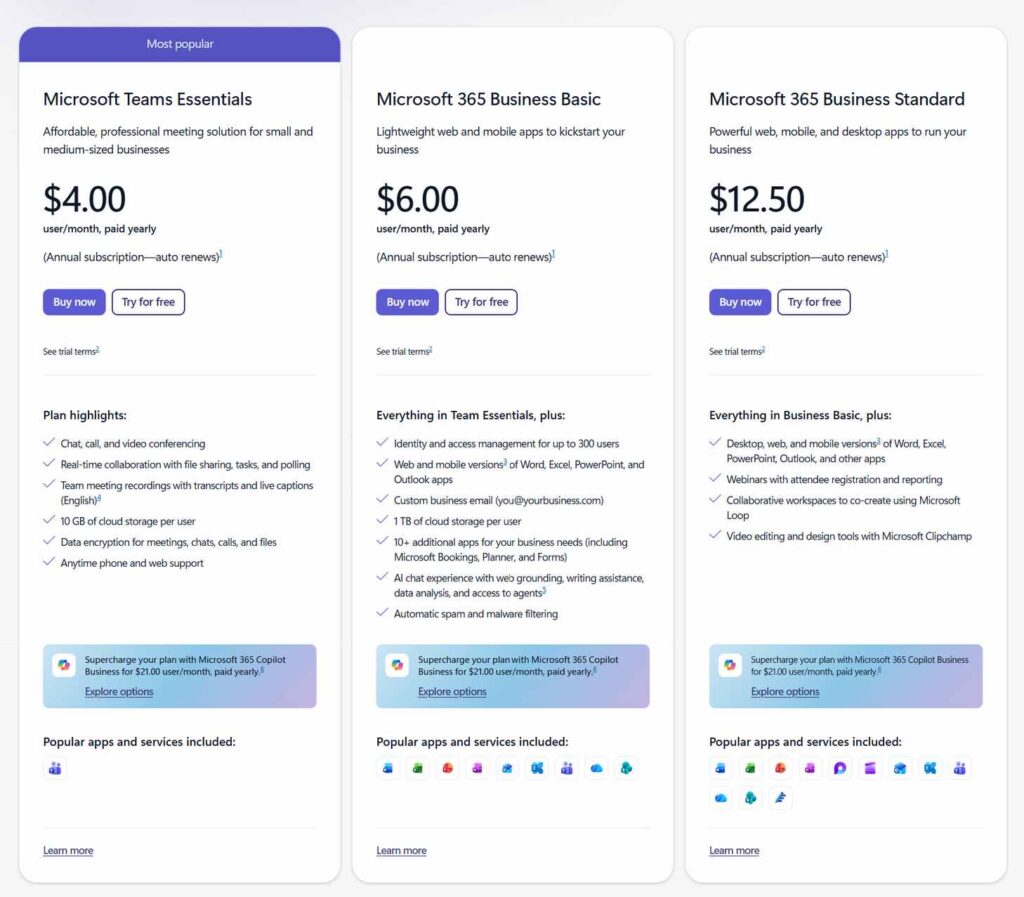
I’ve used Microsoft Teams extensively with clients who are already invested in the Microsoft 365 ecosystem. For these teams, Teams isn’t just a meeting tool—it’s the central hub where work happens. The integration is so seamless that it’s hard to imagine working any other way.
What I Liked
Deep Microsoft 365 integration. Teams is workspace-first, with deep integration into Word, Excel, OneDrive, and SharePoint. For organizations already using Microsoft 365, this is a massive advantage. You can co-edit documents in real-time, share files directly from OneDrive, and collaborate on spreadsheets without leaving the platform.
Persistent chat and channels. Teams supports rich chat between individuals or groups, with the ability to create “Teams” (groups) and within them “Channels” to structure conversations by project, department, or topic. This creates a central hub for all team communication that persists over time.

Strong unified search. Teams offers robust unified search across teams, files, chats, and channels. I’ve found this invaluable when trying to track down a decision made weeks ago or a document shared in a channel.
Excellent value when bundled. Teams is included with Microsoft 365 Business Basic at $6–$7/user/month, which adds Exchange email, SharePoint, 1TB storage, and Office web apps. For teams already paying for Microsoft 365, Teams is essentially free.
AI features are powerful (but cost extra). Microsoft is rolling out major AI upgrades to Teams in 2026, including interactive meeting agents, smarter recaps, and Copilot’s ability to analyze shared on-screen content in real-time. Copilot can summarize web pages, rewrite paragraphs, and provide insights across chats, docs, and meetings.
Enterprise-grade security and compliance. Teams offers enterprise-level policy controls, compliance, and governance that Zoom can’t match. For regulated industries or large organizations, this is a critical advantage.
What I Didn’t Like
Guest experience is more friction-filled. External guests need to verify their identity before joining, which adds steps and friction. For client-facing calls, this is a real disadvantage compared to Zoom’s one-click join.
Meeting quality can vary. While Teams is generally reliable, the experience can vary based on organizational settings. I’ve experienced more dropped calls and quality issues with Teams than with Zoom, especially when guests are joining from outside the organization.
Copilot is expensive. While Zoom AI Companion is included with paid plans, Microsoft 365 Copilot Business costs an additional $21 per user per month. For a team of 10, that’s an extra $2,500+ per year just for AI features.
Breakout rooms are more complex. While available, Teams’ breakout rooms are slightly more complex to set up than Zoom’s. For facilitators running frequent workshops, this adds friction.
Chat sprawl can be an issue. Conversations can become fragmented across channels, private chats, and meetings, making it harder to track decisions over time.
Pricing increases are coming. Microsoft’s July 1, 2026 price increase moves Business Basic to $7 and Business Standard to $14 per user per month. This follows a pattern of increasing costs over time.
Who Should Avoid It
If your team isn’t already using Microsoft 365, Teams requires a significant upfront investment in learning and setup. When you primarily meet with external clients and guests, Zoom’s guest experience is superior. If you’re a freelancer or solopreneur who doesn’t need the full Microsoft ecosystem, Teams is overkill.
Verdict
Microsoft Teams is the best collaboration platform for internal team communication and document-centric work. If your organization already uses Microsoft 365, Teams is the obvious choice. The deep integration with Word, Excel, and Outlook makes it a productivity powerhouse that Zoom simply can’t match.
Score: 8.7/10
Visit Microsoft Teams’ official website →
Head-to-Head: Side-by-Side Results
Meeting Quality
Zoom wins. More consistent audio and video, especially on weaker networks. Teams is reliable, but the experience can vary based on organizational settings.
Guest Experience
Zoom wins decisively. Very smooth and low-friction for external guests. Teams requires identity verification before joining, adding friction.
Collaboration Depth
Teams win. Workspace-first collaboration with Word, Excel, OneDrive, and SharePoint. Zoom is meeting-first, with meeting-focused workflows.
AI Features
Zoom wins on value; AI Companion is included with paid plans. Teams’ Copilot is more powerful but costs an additional $21/user/month. Zoom AI Companion creates meeting summaries, action items, and offers stronger templating and agentic features on paid tiers.
Pricing
Teams wins on starting price $4/user/month vs Zoom’s $13.33–$14.16/user/month. However, Teams’ best value comes when bundled with Microsoft 365 ($6–$7/user/month for Business Basic).
Integrations
Teams wins for Microsoft-native organizations with deep integration with Outlook, SharePoint, and Office apps. Zoom wins for broader third-party integrations across Notion, Slack, and Miro.
❓ Frequently Asked Questions
Is Zoom or Microsoft Teams better in 2026?
It depends on your needs. Zoom is better for external client calls, webinars, and teams that need simplicity and guest-friendly access. Microsoft Teams is better for internal collaboration, document-centric work, and organizations already using Microsoft 365. Many teams use both.
Which is cheaper, Zoom or Microsoft Teams?
Microsoft Teams has a lower starting price at $4/user/month (Essentials). Zoom Workplace Pro starts at $13.33–$14.16/user/month. However, Teams’ best value comes bundled with Microsoft 365 Business Basic at $6–$7/user/month, which adds email, 1TB storage, and Office web apps.
Does Zoom have better video quality than Teams?
In my testing, yes. Zoom delivers more consistent audio and video quality, especially on weaker networks. Teams is generally reliable, but the experience can vary more based on organizational settings. For client-facing calls where quality matters, Zoom is the safer bet.
Can I use Zoom and Microsoft Teams together?
Yes. Many organizations use both Zoom for external client meetings and webinars, and Teams for internal collaboration. Zoom AI Companion can even summarize meetings hosted on Microsoft Teams. Using both gives you the best of both worlds.
Which platform has better AI features, Zoom or Teams?
Zoom offers better value—AI Companion is included with paid plans and creates meeting summaries, action items, and offers templating and agentic features. Teams’ Copilot is more powerful and can analyze shared content in real-time, but costs an additional $21/user/month. If AI is a priority and budget is tight, Zoom wins.
Final Verdict: Zoom vs Microsoft Teams – Which Should You Choose?
After countless hours across both platforms, here’s my honest take: the Zoom vs Microsoft Teams decision comes down to how you work and who you meet with.
Choose Zoom if:
- You regularly meet with external clients, prospects, or guests—Zoom’s guest experience is unmatched
- You need reliable video quality, especially on weaker networks
- You want AI features (meeting summaries, action items) included without extra cost
- You’re a freelancer, agency, or small team that values simplicity
- You run webinars, interviews, or large public sessions
Choose Microsoft Teams if:
- Your organization already uses Microsoft 365—Teams is the natural choice
- You need deep document collaboration with Word, Excel, and SharePoint
- You want persistent chat and channels for internal team communication
- You need enterprise-grade security, compliance, and governance
- You’re a larger organization with defined teams and workflows
The biggest surprise from my testing? How different these tools are for different use cases. Zoom is a meeting tool that happens to have some collaboration features. Teams is a collaboration platform that happens to have meetings. They’re built for fundamentally different workflows.
For freelancers and small business owners who need to impress clients with reliable, friction-free video calls, Zoom is the clear winner. For teams already living inside Microsoft 365 who need a central hub for communication and document collaboration, Teams is the better choice.
If you’re building out your remote work tech stack, pair your chosen platform with a lightweight laptop for travel and remote work and quality wireless earbuds for video calls. And for more software comparisons, check out our guide on best remote work software tools.
The Zoom vs Microsoft Teams debate doesn’t have a single winner. The right choice depends on your team’s specific needs. But in 2026, you have two excellent options, and that’s a win for everyone.