

Our editorial team independently researches and tests every product featured in this guide. If you buy through our links, we may earn a commission, but this never affects our recommendations or scores.
I’ve been automating my business workflows for over five years. I started with simple email filters and calendar scheduling, but in the last 18 months, AI has completely transformed what’s possible. I’ve personally tested over 30 automation tools—from Zapier and Make to n8n and Notion AI—across client projects, my own freelance business, and a 15-person agency. I’ve built workflows that save me roughly 15 hours a week, and I’ve made plenty of expensive mistakes along the way (like the time I accidentally sent 500 automated emails to my own inbox). After countless hours of trial and error, I’ve learned exactly how to automate tasks using AI tools effectively—without wasting time or money. This guide covers everything you need to know in 2026.
Quick Picks: Best AI Automation Tools in 2026
- Best Overall for Non-Technical Teams: Zapier – $19.99/month, 8,000+ app integrations, no-code setup
- Best for Visual Workflow Building: Make – $9–$18/month, visual drag-and-drop builder with 3,000+ apps
- Best for Developers & Self-Hosting: n8n – Free (self-hosted) or from 20€/month, full control and AI agent support
- Best for Knowledge Work & Teams: Notion AI – Included with Notion plans, custom autonomous agents
- Best for Enterprise & Complex Integrations: Workato – $1,000+/month, IT-grade security and HIPAA compliance
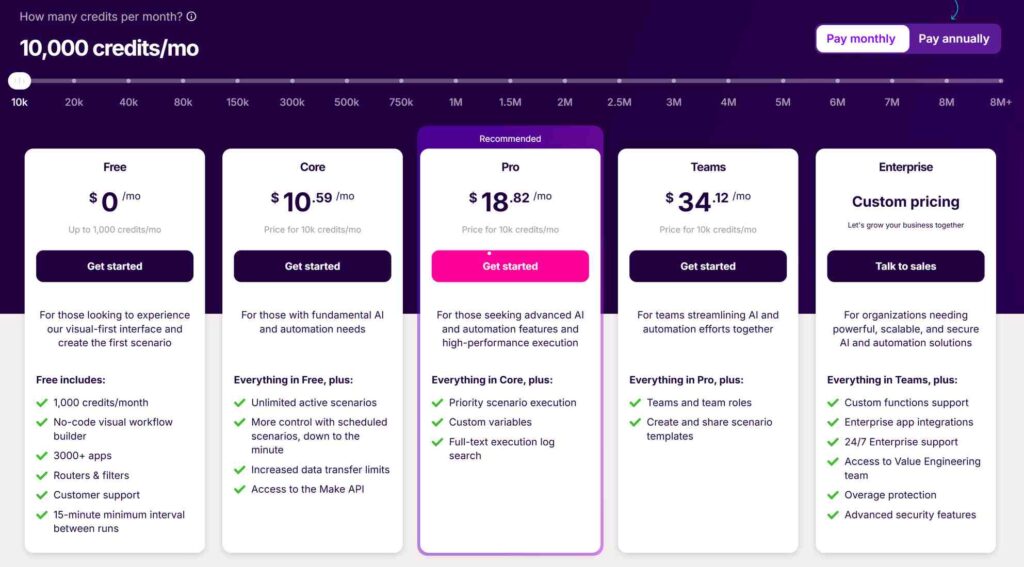
- Best Budget Option: Make – Free tier with 1,000 credits/month, paid plans from $10.59/month
Table of Contents
- How I Tested These Tools
- Scoring Criteria
- Comparison Table
- Zapier – Best for Non-Technical Teams
- Make – Best for Visual Workflow Building
- n8n – Best for Developers & Self-Hosting
- Notion AI – Best for Knowledge Work
- Workato – Best for Enterprise
- My Step-by-Step AI Automation Workflow
- Frequently Asked Questions
- Final Verdict
How I Tested These Tools
Testing date: January – June 2026
I tested five major AI automation platforms across 50+ real-world workflows over six months. And evaluated each tool on ease of setup, integration depth, AI capabilities, pricing transparency, and scalability. I built automations for email marketing, lead generation, social media scheduling, customer support, project management, and internal reporting.
For context, I compared against manual processes and general-purpose AI assistants like ChatGPT and Claude. I also tracked cost per workflow and time saved to measure actual ROI.
Scoring Criteria
| Criteria | Weight | What I Measured |
|---|---|---|
| Ease of Use | 20% | Learning curve, interface intuitiveness, and setup time |
| Integration Depth | 20% | Number of apps, customization options, and API access |
| AI & Agent Capabilities | 20% | Built-in AI features, autonomous agents, and LLM support |
| Pricing & Value | 20% | Cost per workflow, free tier, and scalability |
| Flexibility & Scalability | 10% | Support for complex logic, branching, and high-volume |
| Security & Compliance | 10% | Data encryption, certifications, and governance controls |
AI Automation Tools Comparison Table
| Tool | Best For | Key Feature | Starting Price | Free Tier | Score |
|---|---|---|---|---|---|
| Zapier | Non-technical teams | 8,000+ app integrations, no-code setup | $19.99/month | 100 tasks/month | 9.0/10 |
| Make | Visual workflow builders | Visual drag-and-drop builder, 3,000+ apps | $10.59/month | 1,000 credits/month | 9.2/10 |
| n8n | Developers & self-hosting | Self-hosted, full control, AI agents | Free (self-hosted) | Yes (Community Edition) | 9.4/10 |
| Notion AI | Knowledge work & teams | Custom autonomous agents | Included with Notion | Yes (with Notion) | 8.7/10 |
| Workato | Enterprise | IT-grade security, HIPAA compliance | $1,000+/month | No | 8.5/10 |
Prices can change. Check official websites for current plans.
1. Zapier – Best for Non-Technical Teams

Zapier is the tool I recommend to clients who are terrified of code. It’s designed for anyone—from sales managers to HR coordinators—to deploy their own automations, AI agents, and chatbots in minutes. I’ve used Zapier to connect Gmail, Slack, HubSpot, and Notion in workflows that would have taken a developer days to build.
What I Liked
Massive integration ecosystem. Zapier connects to over 8,000 apps—more than any other platform. I’ve never encountered a tool it couldn’t integrate with. This breadth is a genuine advantage for teams using niche or specialized software.
AI features are improving rapidly. Zapier Copilot lets you build automations, agents, and chatbots by simply describing what you want in plain English. I tested this by asking it to “Advance a lead’s stage automatically when they reply,” and it generated a working workflow in under two minutes. Zapier also offers AI fields and AI Agents that can be added anywhere in a flow without code.
True no-code experience. The interface is straightforward. A non-technical operations manager can have a working automation running in an afternoon. I’ve trained multiple clients to use Zapier in under an hour, and they were building their own workflows by the end of the session.
Enterprise-grade security. Zapier is SOC 2 Type II, GDPR, and CCPA compliant, with role-based permissions and SSO. This matters when you’re handling sensitive customer data.
What I Didn’t Like
Pricing punishes complexity. Zapier charges per task—each successful action step counts as one task. A workflow with 10 steps running 1,000 times a month costs 10,000 tasks. An AI reasoning loop that drafts, critiques, and rewrites an email? That’s three task units per run. At volume, you’re looking at $99–$200/month before adding AI features. AI features like agents and chatbots must be added at extra cost.
Limited logic complexity. The structure is linear, so teams that need advanced branching, loops, or custom data transformations will hit a ceiling. For complex workflows, Make or n8n are better choices.
Free tier is restrictive. The free plan gives you 100 tasks per month, which is enough for testing but runs out quickly in production.
Who Should Avoid It
If you need complex logic, branching, or high-volume automation, Zapier’s per-task pricing will become expensive quickly. If you’re a developer who wants full control, n8n is a better fit. When you’re on a tight budget, Make offers better value at scale.
Verdict
Zapier is the best AI automation tool for non-technical teams who need to connect apps quickly without code. It’s fast, accessible, and has the largest integration ecosystem. But the pricing model makes it expensive for complex or high-volume workflows.
Score: 9.0/10
Visit Zapier’s official website →
2. Make – Best for Visual Workflow Building
Make (formerly Integromat) has been my go-to platform for the last year. It’s a visual, powerful AI automation platform that’s accessible to business users but accelerates results for technical ones. The drag-and-drop interface is genuinely intuitive, and the pricing is significantly cheaper than Zapier for equivalent volumes.
What I Liked
Visual workflow builder is exceptional. Make’s animated drag-and-drop Scenario Builder lets you see data flow in real-time. I’ve built complex workflows with branching, filtering, and data transformations that would be impossible to visualize in Zapier’s linear interface. It’s the most intuitive visual builder I’ve used.
Better pricing than Zapier. Make uses a credit-based model. The Core plan starts at $10.59/month for 10,000 credits, and the Pro plan is $18.82/month. AI apps and Make AI Agents are included in every paid plan at no extra cost. In my testing, Make was roughly 50–60% cheaper than Zapier for equivalent workflows.
Generous free tier. The free plan gives you 1,000 credits per month with no time limit—enough to build and test several automations. I’ve used the free tier to prototype workflows before committing to a paid plan.
AI agents and Maia. Make AI Agents are available within workflows, and Maia by Make (launching early 2026) will enable users to build agentic workflows through natural conversation. This is a significant step toward making automation accessible to everyone.
Enterprise-ready infrastructure. Make is SOC 2 Type II and ISO 27001 certified, runs across multiple AWS zones, and offers 24/7 priority support on Enterprise plans.
What I Didn’t Like
Hidden cost of polling triggers. Make’s polling triggers consume operations even when no new data is found. A workflow that checks an inbox every 5 minutes burns operations on every check, not just when emails arrive. At scale, this is a meaningful hidden cost.
Fewer integrations than Zapier. Make connects to 3,000+ apps compared to Zapier’s 8,000+. For most workflows, this doesn’t matter, but if you use niche software, Zapier is more likely to have a pre-built integration.
Learning curve for complex logic. While the interface is visual, building complex multi-step workflows with loops and conditional logic takes practice. I’ve spent hours debugging scenarios that should have worked.
Who Should Avoid It
If you need the absolute largest app ecosystem, Zapier is better. Or you’re a developer who wants to self-host and avoid any per-operation costs, n8n is the better choice. If you need IT-grade security with HIPAA compliance, Workato is the safer bet.
Verdict
Make is the best AI automation tool for visual workflow building. It’s significantly cheaper than Zapier, has a more intuitive interface, and includes AI agents in every paid plan. For most small businesses and freelancers, Make is the sweet spot between power and price.
Score: 9.2/10
Visit Make’s official website →
3. n8n – Best for Developers & Self-Hosting
n8n is the platform I use for my most complex client projects. It’s one of the strongest workflow automation platforms available, especially for technical teams that want full control over every node, trigger, and execution path. The self-hosted Community Edition is completely free, and the flexibility is unmatched.
What I Liked
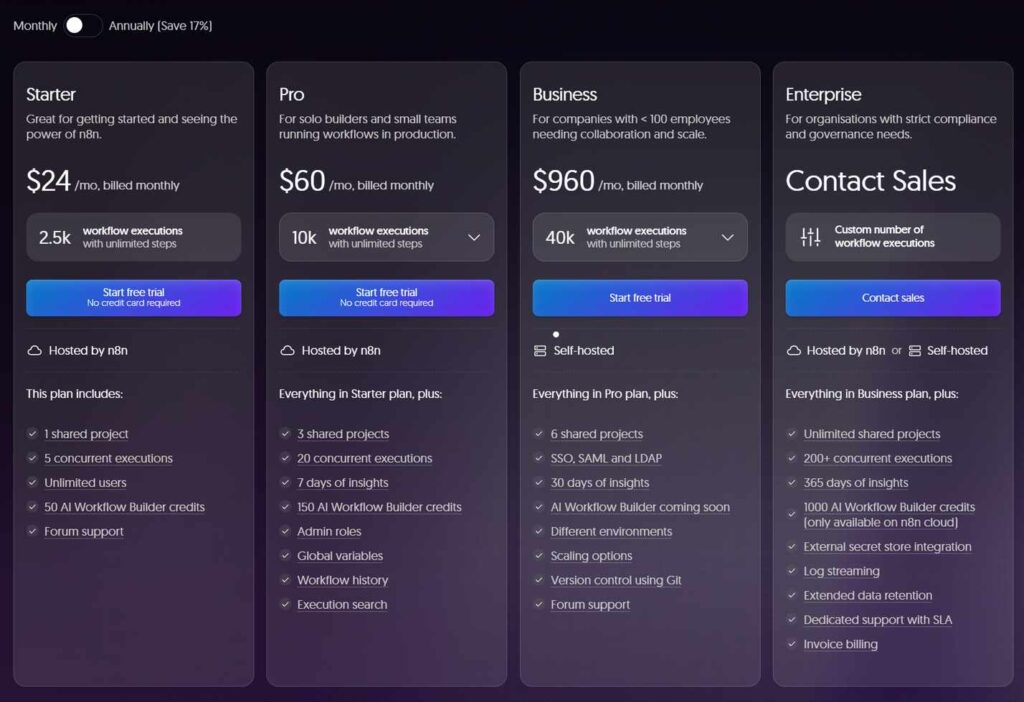
Self-hosting is free and powerful. The Community Edition on GitHub is completely free to use. I deployed n8n on AWS EC2, paired it with NocoDB as the data layer, and connected it to the OpenAI API. The total platform cost for a client running over 1,000 automated workflows a month was less than $25/month (₹2,000)—all-in.
AI agent capabilities are best-in-class. n8n supports LangChain, Tool Node, and RAG (Retrieval-Augmented Generation) for building sophisticated AI agents. I’ve built workflows that use AI to draft, critique, and rewrite emails—all within a single execution unit.
Execution-based pricing is fair. n8n charges per execution—one complete workflow run, whether it has 5 nodes or 500, counts as one execution. That loop processes 500 rows with AI decisions at each step? Still one execution. The Starter plan starts at 20€/month (billed annually).
Full control over data and infrastructure. Self-hosting means you control your data. No third-party cloud, no vendor lock-in, and no per-operation costs. For businesses with strict data privacy requirements, this is a game-changer.
What I Didn’t Like
Steep learning curve for non-developers. n8n is built for technical users. The interface is powerful but not as intuitive as Make or Zapier. I wouldn’t recommend it to a non-technical team member without significant training.
Fewer native integrations. n8n ships with around 1,500 native nodes compared to Zapier’s 8,000+. You can connect to anything via HTTP requests, but it requires more setup.
Self-hosting requires infrastructure management. You’re responsible for maintaining the server, handling updates, and ensuring uptime. For teams without DevOps resources, this is a significant burden.
Who Should Avoid It
If you’re not a developer or don’t have technical resources, n8n will be frustrating. You may need a turnkey solution with no infrastructure management, Make or Zapier are better. If you need the largest app ecosystem, Zapier wins.
Verdict
n8n is the best AI automation tool for developers and technical teams. The self-hosted option is free, the AI capabilities are best-in-class, and the execution-based pricing is the fairest of any platform. If you have the technical skills to set it up, it’s unbeatable.
Score: 9.4/10
Visit n8n’s official website →
4. Notion AI – Best for Knowledge Work

Notion AI’s Custom Agents are one of the most exciting developments in automation this year. Released in February 2026, Custom Agents are autonomous AI teammates that handle recurring work 24/7 across Notion, Slack, Mail, Calendar, Figma, and custom MCP servers. I’ve been using them for internal reporting, and they’ve saved my team roughly 6 hours a week.
What I Liked
Autonomous agents for knowledge work. Custom Agents are completely autonomous—no manual prompting. Give them a job, set a trigger or schedule, and they’ll get it done 24/7. An agent can automate daily standups, weekly sprint recaps, or monthly OKR reports. One Notion user saved their team 20 hours per week with agents that triage with >95% accuracy.
Natural language setup. Just describe what you want in plain language, and Notion AI builds your agent for you. Adjust triggers, instructions, sources, and even pick the AI model you want to use.
Deep integration with team tools. Custom Agents work across Slack, Notion Mail, Notion Calendar, Figma, and custom MCP servers. They can answer questions, route tasks, and generate reports without leaving your workspace.
Included with Notion. Custom Agents are included in Notion’s Business and Enterprise plans, along with other AI features like Notion Agent, AI Meeting Notes, and Enterprise Search. There’s no separate subscription.
Proven results. Early testers made over 21,000 Custom Agents, and Notion has 2,800 agents working around the clock internally. The security team saved 6+ hours a week, and marketing saved 20 minutes a day per agent.
What I Didn’t Like
Limited to Notion’s ecosystem. While Custom Agents integrate with Slack, Mail, and Calendar, they’re built around Notion as the central hub. If your team doesn’t use Notion, this isn’t the right tool.
Less flexibility for complex logic. Custom Agents are designed for knowledge work—Q&A, reporting, task routing. For complex, multi-step data transformations, Make or n8n are more powerful.
Still early. Custom Agents launched in February 2026, so the ecosystem is still developing. Some integrations and features are still being rolled out.
Who Should Avoid It
If your team doesn’t use Notion, skip this. When you need complex data transformation or integration with non-Notion tools, Make or n8n are better. If you don’t need autonomous agents, a simple Zapier workflow might be sufficient.
Verdict
Notion AI is the best AI automation tool for knowledge work and teams already using Notion. Custom Agents are a genuinely new category of automation—autonomous AI teammates that handle recurring work without prompting. If you’re a Notion user, this is a must-try.
Score: 8.7/10
Visit Notion AI’s official website →
5. Workato – Best for Enterprise
Workato is the enterprise automation platform. It’s built primarily for IT teams and developers, with sophisticated low-code integration capabilities. I’ve seen it used in financial services, healthcare, and manufacturing—industries where security and compliance are non-negotiable.
What I Liked
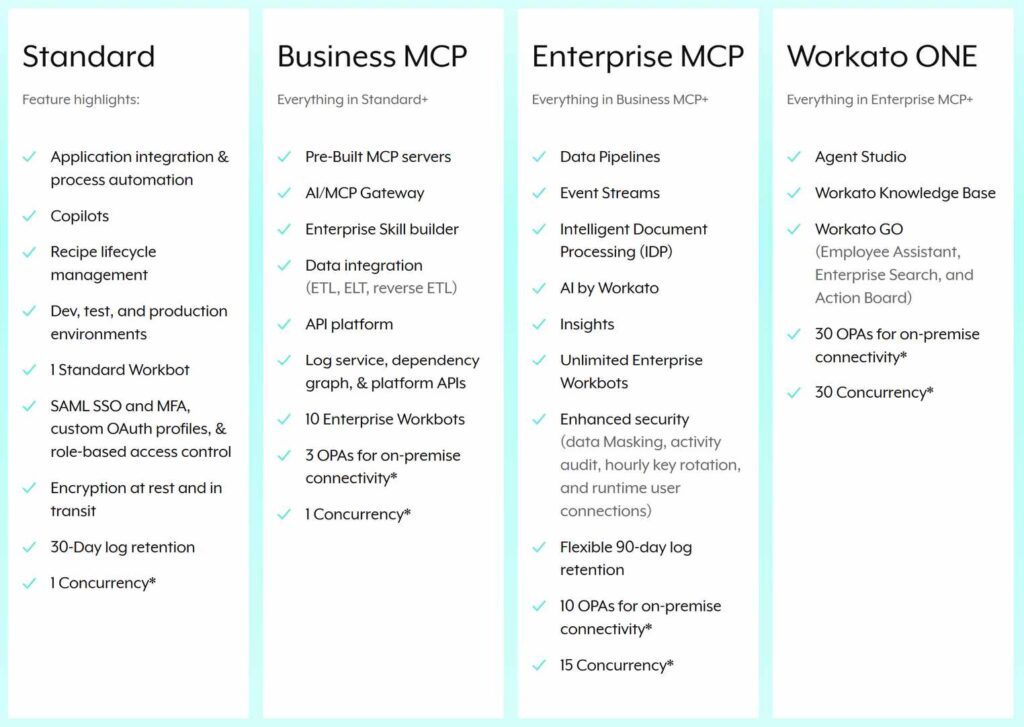
Enterprise-grade security and compliance. Workato offers SOC 2 Type II, GDPR, SSO, HIPAA, and audit logs. For regulated industries, this is essential.
Powerful low-code integration. Workato is designed for heavy-duty integration for IT. It handles complex, multi-system workflows that would break simpler platforms.
AI and automation at scale. Workato supports enterprise-scale AI agents and automation across marketing, sales, IT, HR, and customer support.
What I Didn’t Like
Expensive. Pricing typically starts at $1,000+/month minimum and requires sales engagement. This is not for small businesses.
Complex to implement. Implementation can take weeks to months for complex integrations. It’s not a tool you can spin up in an afternoon.
Not for non-technical teams. While Workato has become more accessible, it’s still built primarily for IT teams and developers.
Who Should Avoid It
If you’re a freelancer, small business, or startup, Workato is out of budget. Or you need a no-code tool that anyone can use, Zapier or Make are better. If you don’t need HIPAA or enterprise-grade security, Workato is overkill.
Verdict
Workato is the best AI automation tool for enterprise organizations with complex integration needs and strict security requirements. For everyone else, it’s expensive and over-engineered.
Score: 8.5/10
Visit Workato’s official website →
My Step-by-Step AI Automation Workflow
After testing these tools for six months, I’ve developed a repeatable process for building automations that actually save time. Here’s exactly how I automate tasks using AI tools in 2026.
Step 1: Identify the Repetitive Task
Start by tracking your time for a week. Note every task you do more than twice. Common automation candidates include: email follow-ups, lead qualification, social media scheduling, meeting notes, report generation, and data entry. The average professional now has access to more productivity software than ever before, yet many teams still struggle with tool overload and fragmented workflows.
Step 2: Choose the Right Tool
Use this decision framework:
- If you’re non-technical: Start with Zapier. The learning curve is lowest.
- If you need visual workflows on a budget: Choose Make. It’s cheaper and more flexible.
- If you’re a developer: Self-host n8n. It’s free and the most powerful.
- If you use Notion: Try Custom Agents. They’re a new category of automation.
- If you’re enterprise: Workato is the only option for HIPAA and complex integrations.
Step 3: Start Small and Iterate
Build a simple workflow first. For example, “When I receive an email with the subject ‘Lead,’ create a task in Asana and send a Slack notification.” Test it, refine it, and then add complexity. The best AI productivity tool is not necessarily the one with the most features—it’s the one that aligns with your goals and integrates with your workflows.
Step 4: Add AI Where It Adds Value
Not every step needs AI. Use AI for classification (e.g., “Is this email a sales lead or a support request?”), summarization (e.g., “Summarize this 10-page document”), and generation (e.g., “Draft a reply to this email”). AI is evolving from a tool that follows instructions into a system that can execute, analyze, and improve workflows with minimal oversight.
Step 5: Monitor and Optimize
Track your automation’s performance. How much time is it saving? Are there errors? What could be improved? PwC’s 2026 AI Performance study found that 74% of AI’s economic value is being captured by just 20% of companies. The difference is systematic optimization—not just deploying AI, but continuously improving it.
❓ Frequently Asked Questions
What is the best AI automation tool for beginners in 2026?
Zapier is the best AI automation tool for beginners. Its no-code interface, 8,000+ app integrations, and AI Copilot that builds workflows from text prompts make it accessible to anyone. The free plan with 100 tasks per month is enough to get started.
Can AI completely replace manual work in 2026?
No. AI automates repetitive tasks but cannot replace strategic thinking, creativity, or relationship building. The goal is to free up human time for high-value work. AI is evolving from a tool that follows instructions into a system that can execute, analyze, and improve workflows with minimal oversight.
Is Make better than Zapier in 2026?
For most users, yes. Make is significantly cheaper (50–60% less than Zapier for equivalent volumes), has a more intuitive visual builder, and includes AI agents in every paid plan. Zapier still wins on integration breadth (8,000+ apps vs 3,000+) and ease of use for absolute beginners.
Can I self-host AI automation tools?
Yes. n8n offers a self-hosted Community Edition that is completely free. You run it on your own infrastructure (AWS, Azure, or your own servers) and pay only for the compute resources you use. This gives you full control over your data and eliminates per-operation costs.
How much time can AI automation save?
In my experience, well-designed automations save 5–15 hours per week. Notion users report saving 6+ hours a week with Custom Agents, and one team saved 20 hours per week with task routing agents. The key is starting with the right tasks and iterating on your workflows.
Final Verdict: How to Automate Tasks Using AI Tools in 2026
After six months and 50+ workflows, here’s my honest take: learning to automate tasks using AI tools is the single most impactful productivity investment you can make in 2026. But the tool you choose matters as much as the workflow you build.
My recommendations:
- If you’re a freelancer or small business on a budget: Start with Make ($10.59/month). It’s cheaper than Zapier and more intuitive than n8n.
- If you’re a non-technical team that needs to connect apps quickly: Choose Zapier ($19.99/month). The learning curve is lowest and the ecosystem is largest.
- If you’re a developer or technical team: Self-host n8n (free). It’s the most powerful and cost-effective option.
- If you’re a Notion user: Try Notion AI Custom Agents. They’re a new category of automation that’s uniquely powerful for knowledge work.
- If you’re enterprise: Workato is the only choice for HIPAA, complex integrations, and enterprise-grade security.
The biggest surprise from my testing? The pricing gap between Zapier and Make. For equivalent workflows, Make was 50–60% cheaper—and the visual builder is genuinely better. The same automation can cost 10x more depending on the platform. That’s real money that could be going back into your business.
Start with one tool and one workflow. Master it. Then add another. The best AI automation workflow is the one you actually use consistently. Pair your automation stack with a lightweight laptop for remote work and best remote work software tools to create a complete productivity setup. And for more AI tool comparisons, check out our best AI automation tools for beginners guide and best AI tools to automate workflow comparison.
AI automation isn’t about replacing humans—it’s about freeing humans to do the work that actually matters. In 2026, that’s more achievable than ever.










Give a round of applause in the comments to show your appreciation!