

Finding a great mechanical keyboard on a budget used to mean sacrificing build quality, hot-swappable switches, or that satisfying typing feel. Not anymore. In 2026, the best budget mechanical keyboards deliver premium features for under $80—some even under $50.
But the market is flooded. For every hidden gem, there are three boards with rattly stabilizers, mushy switches, and RGB that looks like a toddler’s nightlight. So I ordered seven popular budget mechanical keyboards and put them through the same typing, gaming, and daily-use grind in April 2026.
Some impressed me straight out of the box. Others didn’t survive the first hour of real work. This guide shows which budget mechanical keyboards are actually worth your money.
Disclosure: Some links are affiliate links. If you click through and buy, we may earn a small commission at no extra cost. We only recommend products we’ve personally tested and would use ourselves.
Quick Picks
Best Overall
Best for Gaming
Best Compact (60%)
Best Wireless
Best Ultra-Budget
Table of Contents
- How I Tested
- Scoring Criteria
- Comparison Table
- 1. Keychron V1 Max – Best Overall
- 2. Redragon K688 RGB – Best for Gaming
- 3. Royal Kludge RK61 Plus – Best Compact
- 4. Epomaker TH80 Pro – Best Wireless
- 5. Redragon K552 Kumara – Best Ultra-Budget
- Head-to-Head Winners
- Real Limitations
- FAQ
- Final Verdict
How I Tested These Keyboards
Testing Date: April 2026
I used each keyboard as my daily driver for a minimum of three full workdays. That included writing long-form articles, replying to emails, editing spreadsheets, and casual gaming sessions (Apex Legends, Baldur’s Gate 3). I paid attention to:
- Switch feel and consistency out of the box
- Stabilizer rattle on larger keys (spacebar, enter, backspace)
- Build quality, flex, and case ping
- Wireless performance and battery life where applicable
- Software experience and customization
Scoring Criteria
| Factor | Weight |
|---|---|
| Typing feel and sound | 35% |
| Build quality | 25% |
| Features per dollar | 20% |
| Software and customization | 10% |
| Aesthetics | 10% |
Comparison Table
| Keyboard | Layout | Switches | Connection | Price* | Score |
|---|---|---|---|---|---|
| Keychron V1 Max | 75% | Keychron Super Red/Blue/Brown | Wired + Wireless | $74 | 9.4 |
| Redragon K688 RGB | 75% | Redragon Linear Red | Wired + Wireless | $69 | 9.1 |
| Royal Kludge RK61 Plus | 60% | RK Switch Red/Blue/Brown | Wired + Wireless | $55 | 8.9 |
| Epomaker TH80 Pro | 75% | Epomaker Flamingo/Budgerigar | Wired + Wireless | $79 | 8.8 |
| Redragon K552 Kumara | TKL (87-key) | Outemu Blue | Wired | $32 | 8.5 |
*Prices can change. Check official websites for current pricing.
1. Keychron V1 Max – Best Budget Mechanical Keyboard Overall
What I Found
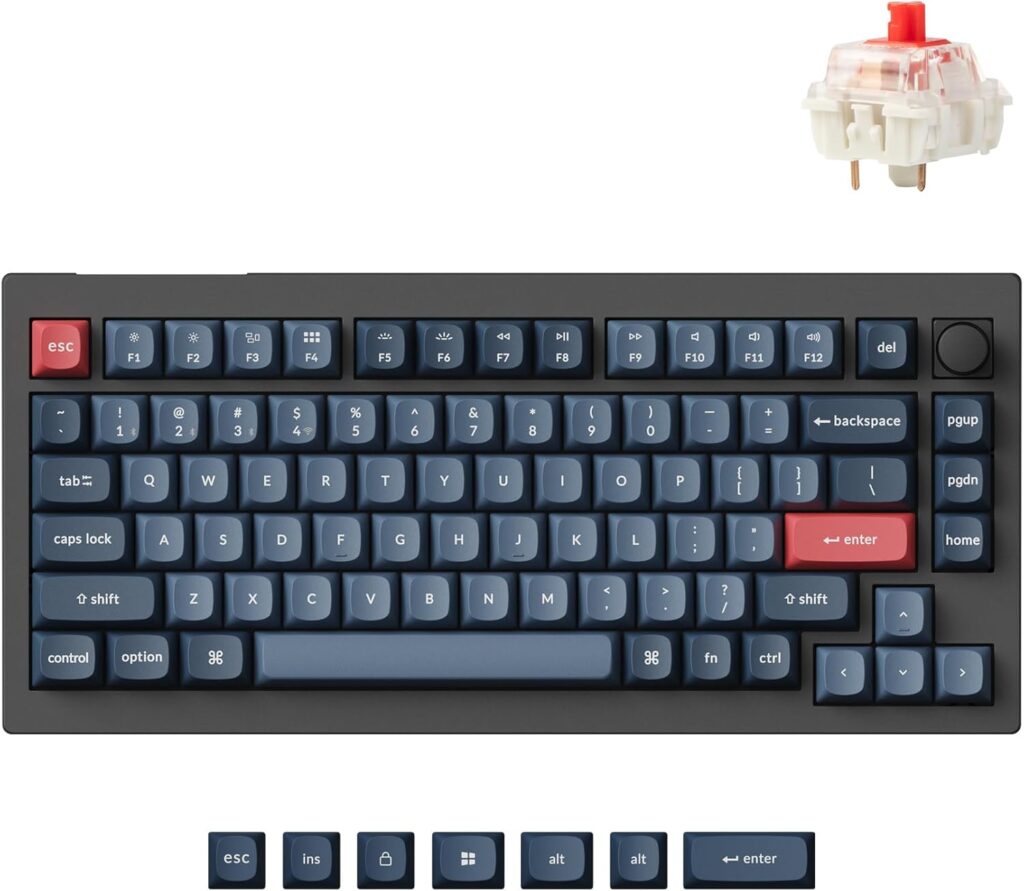
The Keychron V1 Max sits at the top of the budget bracket because it doesn’t feel like a compromise. The gasket mount design absorbs typing shock, so your fingers don’t get fatigued during long sessions. The pre-lubed Keychron Super switches come smooth right out of the box, and the stabilizers are the best I’ve heard on a sub-$80 board.
What I Liked
- Gasket mount and pre-lubed switches feel premium
- Hot-swappable PCB lets you change switches later
- QMK/VIA support for deep customization
- Wireless connectivity (Bluetooth 5.2 + 2.4 GHz dongle)
What I Didn’t Like
- Plastic case, though dense and well-built
- No adjustable feet for typing angle
Who Should Avoid It
- Users who need a full 100% layout with numpad
Verdict
The V1 Max is the keyboard I kept on my desk after testing. It punches well above its price and pairs beautifully with a clean desk setup—if you’re also shopping for accessories, check out our guide to the best laptop accessories in 2026 to complete your workspace. You can grab the V1 Max directly from this link: Keychron website.
Score: 9.4/10
2. Redragon K688 RGB – Best Budget Mechanical Keyboard for Gaming
What I Found
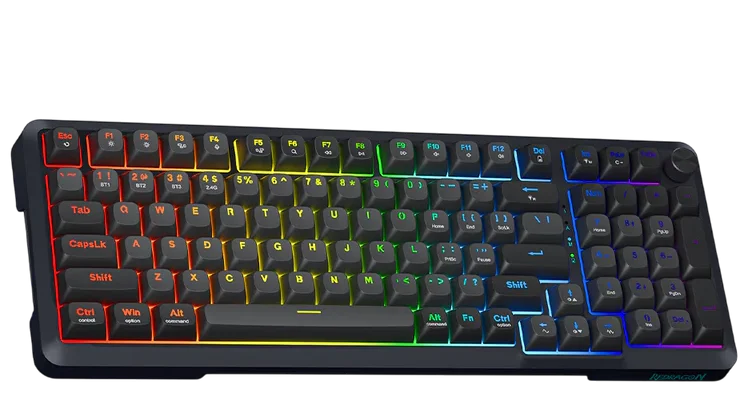
Redragon’s K688 surprised me. The linear red switches felt fast and consistent for gaming, with zero noticeable input lag over the 2.4 GHz connection. The volume knob is a practical touch many budget boards skip, and the hot-swappable sockets mean you can drop in faster switches later if you want.
What I Liked
- Responsive linear switches ideal for gaming
- Volume knob and dedicated macro keys
- Solid build with minimal case flex
What I Didn’t Like
- RGB software feels dated
- Stabilizers needed a little lube for a thockier sound
Who Should Avoid It
- Typists who prefer tactile or clicky feedback
Verdict
A fantastic choice if you game more than you type. Pair it with a budget gaming mouse under $50, and you’ve got a competitive setup for under $120 total. See the latest price on this link: Redragon.
Score: 9.1/10
3. Royal Kludge RK61 Plus – Best Budget 60% Mechanical Keyboard
What I Found
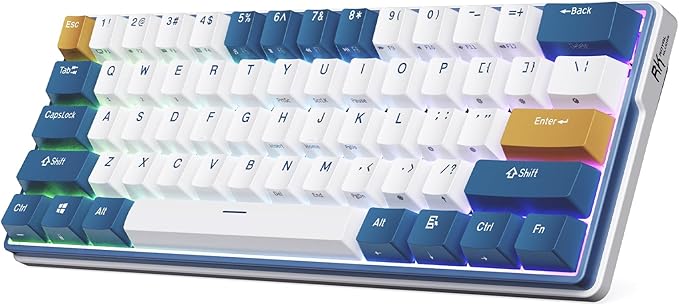
The RK61 Plus has been a budget favorite for years, and the 2026 revision keeps it relevant. The 60% layout saves desk space while keeping the essential keys accessible through a well-thought-out function layer. RK’s new switches feel smoother than the previous generation, and the sound profile is surprisingly deep for a plastic case.
What I Liked
- Extremely portable, fits in any bag
- Bluetooth + 2.4 GHz + wired modes
- Improved stabilizers over previous model
What I Didn’t Like
- Function layer learning curve for arrow keys
- Battery life is average with RGB on
Who Should Avoid It
- Users who need dedicated arrow keys and a numpad
Verdict
The RK61 Plus is the one I’d toss in my backpack for a coffee shop writing session. Tiny, capable, and a great value at $55. Check it out on this link: Royal Kludge.
Score: 8.9/10
4. Epomaker TH80 Pro – Best Budget Wireless Mechanical Keyboard
What I Found
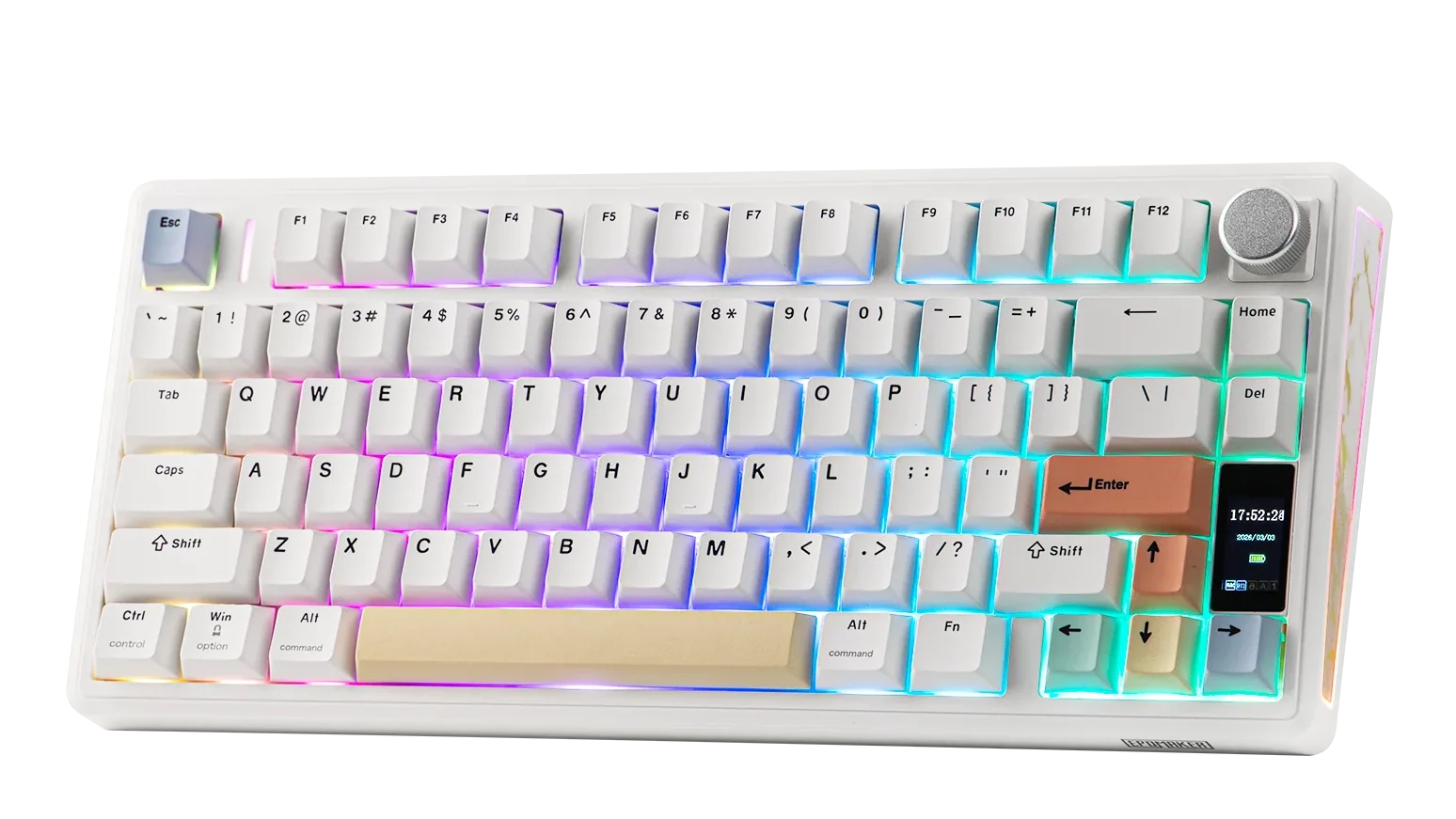
The Epomaker TH80 Pro prioritizes wireless freedom and typing comfort. Its 75% layout includes a handy volume knob, and the Epomaker Flamingo switches (linear, 40gf actuation) felt featherlight but precise. Over Bluetooth, I experienced zero missed keystrokes during a full workday, and the 4000mAh battery lasted about a week with moderate RGB use.
What I Liked
- Excellent wireless reliability
- Smooth, light switches for fast typing
- South-facing RGB, better for aftermarket keycaps
What I Didn’t Like
- Software is functional but clunky
- Keycaps are thin ABS plastic (swap them later)
Who Should Avoid It
- Users who never use wireless and want cheaper wired options
Verdict
If a clean, cable-free desk matters to you, the TH80 Pro is the best budget wireless mechanical keyboard I tested. Grab yours directly from this link: Epomaker.
Score: 8.8/10
5. Redragon K552 Kumara – Best Ultra-Budget Mechanical Keyboard
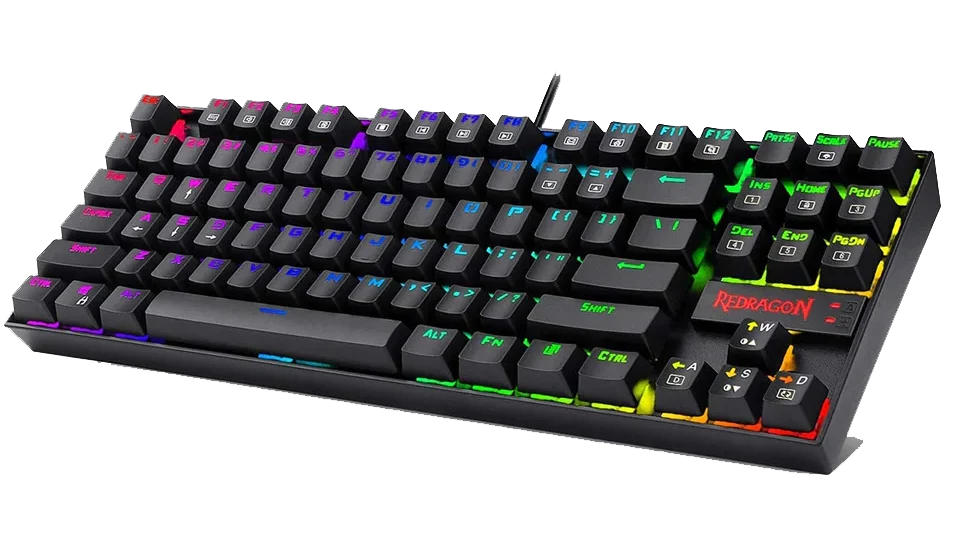
What I Found
The K552 Kumara is the cheapest mechanical keyboard I can comfortably recommend. At around $32, it’s all wired, all plastic, and uses clicky Outemu Blue switches. It’s loud—really loud—but if you love that crisp click and a tactile bump on every press, it’s a joy to type on. Build quality is surprisingly solid for the price, with a metal top plate that eliminates flex.
What I Liked
- Unbeatable price for a genuine mechanical experience
- Satisfying clicky switches
- Metal top plate adds rigidity
What I Didn’t Like
- Extremely loud; not suitable for shared spaces
- Non-removable USB cable
Who Should Avoid It
- Anyone working near other people (or on voice calls without a noise filter)
Verdict
The K552 is your gateway drug into mechanical keyboards. It costs less than a large pizza and delivers the real deal. See it on this link: Redragon.
Score: 8.5/10
Head-to-Head Winners
| Category | Winner |
|---|---|
| Best Typing Feel | Keychron V1 Max |
| Best Gaming Performance | Redragon K688 |
| Best Portability | Royal Kludge RK61 Plus |
| Best Wireless | Epomaker TH80 Pro |
| Best Absolute Value | Redragon K552 |
Real Limitations I Noticed During Testing
These are not spec-sheet issues—they actually happened while I used each keyboard.
Keychron V1 Max
Bluetooth would occasionally lag after waking the PC from sleep; toggling the connection fixed it instantly.
Redragon K688
The macro keys are unlabeled and took a few tries to program correctly.
RK61 Plus
The keycap font is still a bit gamer-ish; I swapped them for a clean set within a week.
Epomaker TH80 Pro
The knob wobbles slightly. Not a dealbreaker, but noticeable if you’re picky.
Redragon K552
The blue switches are genuinely disruptive in an open office. I had to switch to headphones.
FAQ – Budget Mechanical Keyboards
Can you get a good mechanical keyboard under $50?
Yes. The Redragon K552 Kumara proves you can get a solid, durable mechanical keyboard for around $32. You sacrifice wireless connectivity and hot-swappable switches, but the core typing experience is real and satisfying.
Which switch type is best for typing?
Tactile switches (like browns) offer a bump without the loud click, making them a great middle ground for typing. Linear switches (reds) are smoother and quieter, preferred for gaming. Clickies (blues) are the most satisfying for typists who love feedback but are too loud for shared spaces.
Are hot-swappable switches worth it on a budget board?
Absolutely. Hot-swappable PCBs let you change switches later without soldering. It’s the single most valuable feature to look for because it future-proofs your keyboard and lets you experiment as your preferences evolve.
Is wireless reliable on budget keyboards in 2026?
Yes. Both the Keychron V1 Max and Epomaker TH80 Pro maintained stable 2.4 GHz connections during my entire testing period. Bluetooth is fine for general productivity, but I recommend the included dongle for gaming or latency-sensitive tasks.
Final Verdict: Which Budget Mechanical Keyboard Should You Buy?
If you want one recommendation without overthinking it, get the Keychron V1 Max. It’s the best balance of typing quality, features, and build that I’ve found under $80. The gasket mount and pre-lubed switches genuinely feel like a more expensive keyboard, and QMK/VIA support gives you room to grow.
Gamers on a budget should grab the Redragon K688. Fast, responsive, and that volume knob is surprisingly useful in the heat of a match.
If you’re counting every dollar, the Redragon K552 at $32 is the best entry point. Yes, it’s loud. Yes, it’s wired. But it delivers the real mechanical feel that makes membrane boards feel like typing on wet cardboard.
Pair any of these keyboards with a great mouse and a comfortable pair of earbuds, and you’ve built yourself a workspace that’s a pleasure to sit at every morning. Need recommendations? We’ve also tested the best wireless earbuds for work and video calls and the best gaming mouse under $50 to complete your setup.
For more honest tech reviews and tested buying guides, visit QalTech.com.