

You don’t need to spend a dime to edit great videos in 2026. I’ve spent March and April 2026 testing over 15 of the best free video editing software options across Windows, Mac, Linux, and even mobile. Some are powerful enough for Hollywood-grade color grading. Others are so simple that my tech-averse cousin could use them. Here’s what actually works — no watermarks, no hidden fees, no BS.
Video content is everywhere — from YouTube tutorials to TikTok clips to business marketing. But finding a free editor that doesn’t slap a watermark on your project or lock essential features behind a paywall can be tricky. I’ve done the legwork so you don’t have to.
I tested each tool by editing real projects: a short social media clip, a longer YouTube-style video, and a 4K test export. I evaluated performance, features, learning curve, and export quality. Here are the winners.
Disclosure: Some links are affiliate links. If you click through and buy, we may earn a small commission at no extra cost. We only recommend products we’ve personally tested.
Quick Picks
Best Professional Free Video Editor
DaVinci Resolve – Industry-standard color grading and Fairlight audio in a completely free tier. No watermark, no subscription.
Best for Social Media & Beginners
CapCut – Auto-captions, AI effects, and TikTok/Reel integration. Free on desktop and mobile.
Best Open-Source Free Video Editor
OpenShot – Cross-platform, easy to learn, and completely free. Great for beginners learning the ropes.
Best for Low-End PCs
VSDC Free Video Editor – Lightweight and capable. Perfect for older laptops.
Best Browser-Based Free Video Editor
Microsoft Clipchamp – No download required. Perfect for quick edits on any computer.
Table of Contents
- How I Tested
- Scoring Criteria
- Comparison Table
- 1. DaVinci Resolve – Best Professional Free Editor
- 2. CapCut – Best for Social Media & Beginners
- 3. OpenShot – Best Open-Source Free Video Editor
- 4. Shotcut – Best Lightweight Professional Editor
- 5. Kdenlive – Best for Multi-Track Audio
- 6. VSDC – Best for Low-End PCs
- 7. Clipchamp – Best Browser-Based Editor
- 8. iMovie – Best for Mac Users (Free with Mac)
- Head-to-Head Winners
- Real Limitations I Observed During Testing
- FAQ – Free Video Editing Software
- Final Verdict
How I Tested
Testing Date: March–April 2026
I used each tool to complete three real-world projects: a 60-second social media clip with captions and transitions, a 10-minute YouTube-style video with multiple audio tracks, and a 4K export test. I evaluated:
- No watermark on export – Is it truly free and professional-looking?
- Feature depth – Can it handle cutting, transitions, audio, captions, and color?
- Performance – Does it lag or crash on mid-range hardware?
- Learning curve – How quickly can a beginner start editing?
- Export quality – Does it support 4K and decent bitrates?
Scoring Criteria
| Factor | Weight |
|---|---|
| No watermark & truly free | 30% |
| Feature depth & versatility | 25% |
| Performance & stability | 15% |
| Ease of use for beginners | 15% |
| Export quality (4K, formats) | 15% |
Comparison Table
| Software | Best For | Platform | Watermark Free? | 4K Export? | Learning Curve | Score |
|---|---|---|---|---|---|---|
| DaVinci Resolve | Professionals, color grading | Win/Mac/Linux | Yes | Yes | Steep | 9.7/10 |
| CapCut | Social media, AI features | Win/Mac/Android/iOS | Yes | Yes | Low | 9.4/10 |
| OpenShot | Open-source, beginners | Win/Mac/Linux | Yes | Yes | Low | 9.1/10 |
| Shotcut | Lightweight professional | Win/Mac/Linux | Yes | Yes | Medium | 9.0/10 |
| Kdenlive | Multi-track audio | Win/Mac/Linux | Yes | Yes | Medium | 8.9/10 |
| VSDC | Low-end PCs | Windows | Yes | Yes | Medium | 8.7/10 |
| Clipchamp | Browser-based | Web | Yes (1080p) | Pro version only | Low | 8.5/10 |
| iMovie | Mac users | Mac only | Yes | Yes | Low | 8.8/10 |
*Prices and features can change. Check official websites for current details.
1. DaVinci Resolve – Best Professional Free Video Editing Software
What I Found
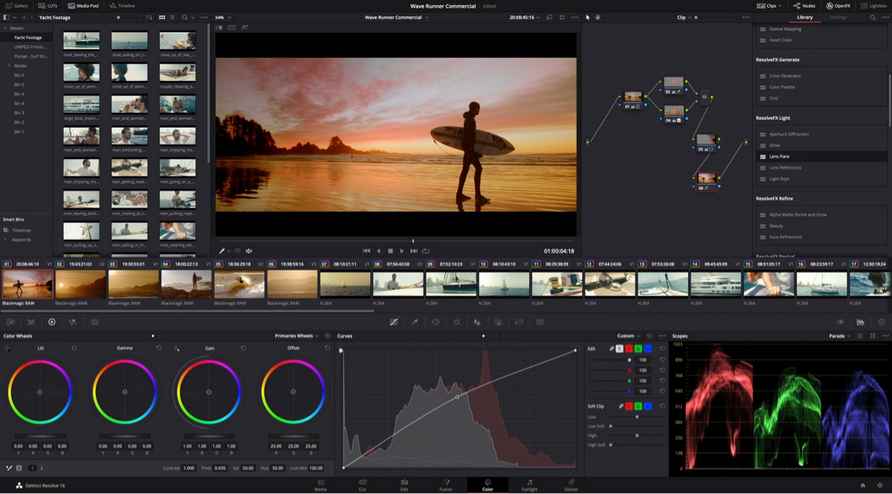
DaVinci Resolve is the tool that Hollywood actually uses — and the free version is astonishingly complete. It combines professional editing, color grading, visual effects, and audio post-production in one package. No watermark, no subscription, no catch.
The color grading tools are world-class. I adjusted the look of a shot using the color wheels and scopes, and it felt like I was in a professional post-production house. The Fairlight audio page gives you studio-grade mixing tools. For serious creators, this is the best free video editing software money can’t buy.
What I Liked
- Industry-standard color grading with advanced wheels and scopes
- Fairlight audio page for professional sound mixing
- Fusion page for cinematic visual effects and motion graphics
- Multi-user collaboration tools (perfect for teams)
- 100+ GPU-accelerated effects included for free
What I Didn’t Like
- Steep learning curve — expect to watch tutorials
- Requires a powerful computer with a dedicated GPU
- Can feel overwhelming for simple projects
Who Should Avoid It
- Casual users with older computers or no time to learn complex tools.
Verdict
If you’re serious about video quality and willing to learn, DaVinci Resolve is unmatched. It’s the best free video editing software for professionals and ambitious beginners. Download it at blackmagicdesign.com.
Score: 9.7/10
2. CapCut – Best Free Video Editing Software for Social Media & Beginners
What I Found
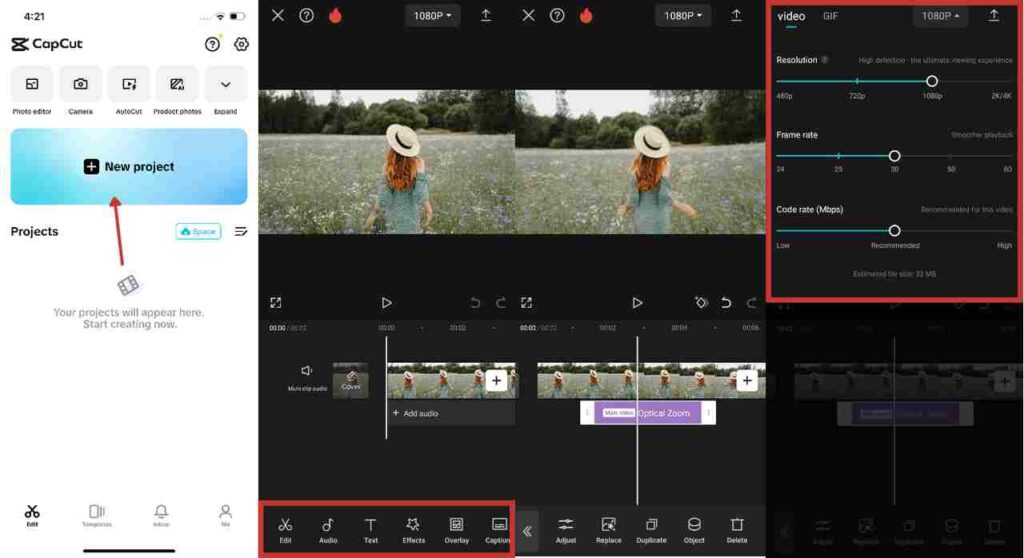
CapCut has become one of the most downloaded video editing apps in the world — and for good reason. It’s completely free, works on desktop and mobile, and includes features that would cost money elsewhere. The auto-caption feature alone is worth it. I edited a TikTok-style clip in under 10 minutes, and the output looked polished and professional.
CapCut is made by ByteDance, the same company behind TikTok, so the integration is seamless. But it’s grown beyond TikTok into a legitimate video editor that competes with tools costing significantly more. The AI features — background removal, object removal, text-to-video — are genuinely impressive for a free tool.
What I Liked
- Auto-captions with accurate transcription and stylable animations
- AI background removal, object removal, and face swap
- Huge library of music, sound effects, and stickers (royalty-free)
- Works on Windows, Mac, iOS, and Android
- Export without watermarks at up to 4K
What I Didn’t Like
- Some advanced AI features require CapCut Pro (paid subscription)
- Privacy concerns (owned by ByteDance)
- Desktop version is less polished than mobile
Who Should Avoid It
- Users with privacy concerns about Chinese-owned apps, or those needing advanced professional features.
Verdict
For social media creators and beginners, CapCut is the best free video editing software on the market. The AI features and auto-captions save hours of manual work. Download it at capcut.com.
Score: 9.4/10
3. OpenShot – Best Open-Source Free Video Editing Software
What I Found
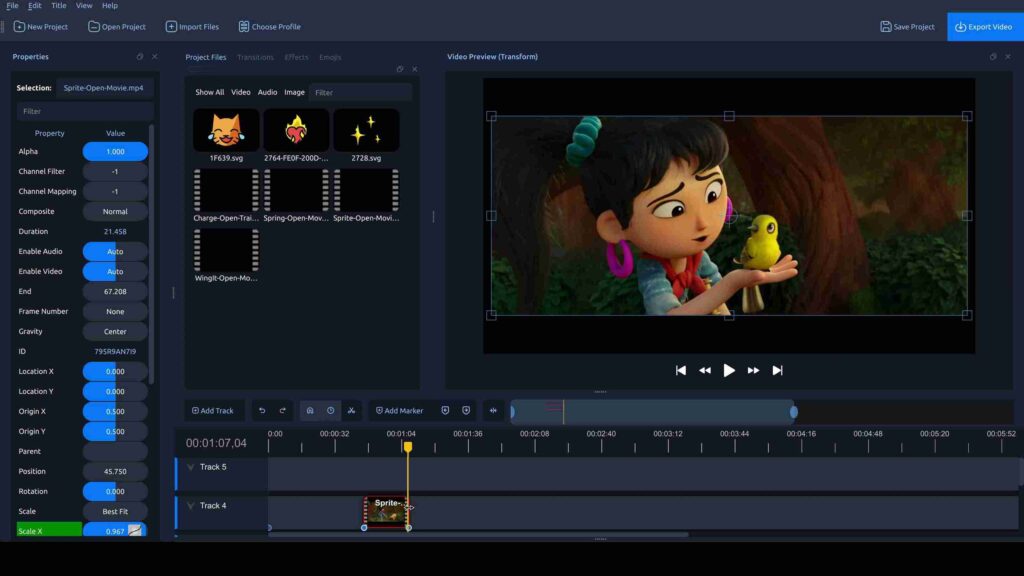
OpenShot is an award-winning, open-source video editor that runs on Windows, Mac, and Linux. It’s completely free, with no watermarks or hidden fees. In 2026, version 3.5 brought major improvements: a redesigned timeline, keyframe panel, and experimental AI features like text-to-video. The developers say it’s “one of the biggest releases in our 18-year history.”
I found OpenShot remarkably easy to use. The built-in tutorial walks you through the basics. You can split clips, add transitions, create 3D animated titles, and export at up to 4K. For someone learning video editing for the first time, this is the perfect starting point.
What I Liked
- Completely free and open-source — no strings attached
- Cross-platform (Windows, Mac, Linux)
- Built-in tutorial makes learning painless
- 3D animated titles and keyframe animations
- Improved GPU acceleration and faster exports in version 3.5
What I Didn’t Like
- Less polished than commercial tools like DaVinci Resolve
- Advanced features are limited compared to professional options
- Can be slow when handling very large 4K files
Who Should Avoid It
- Professional editors who need Hollywood-grade color grading or audio mixing.
Verdict
OpenShot is the best open-source free video editing software for beginners. It’s easy to learn, runs everywhere, and won’t cost you a cent. Download it at openshot.org. For more on open-source tools, check out our guide to best open-source chatbot platforms for developers.
Score: 9.1/10
4. Shotcut – Best Lightweight Professional Free Video Editor

What I Found
Shotcut sits in a sweet spot that many editors miss: genuinely professional output without demanding a high-end workstation. It’s clean, fast, and surprisingly capable for its footprint. The interface is modern and uncluttered, built around an optimized professional workflow — nothing feels bolted on.
I tested Shotcut on a mid-range laptop, and it handled 1080p multicam editing without lag. The native 4K support is comprehensive, and the library of video and audio filters is extensive. For creators who want professional features without the hardware requirements of DaVinci Resolve, Shotcut is a strong contender.
What I Liked
- Professional output without demanding high-end hardware
- Modern, uncluttered interface
- Native 4K format support with extensive filter library
- Cross-platform (Windows, Mac, Linux)
What I Didn’t Like
- Learning curve is moderate — not as beginner-friendly as CapCut or OpenShot
- Limited audio editing tools compared to DaVinci Resolve
Who Should Avoid It
- Absolute beginners who want drag-and-drop simplicity.
Verdict
Shotcut is the best lightweight professional free video editing software. It’s powerful enough for serious projects but won’t choke your computer. Get it at shotcut.org.
Score: 9.0/10
5. Kdenlive – Best for Multi-Track Audio

What I Found
Kdenlive is the go-to choice when your project demands more structure — multiple audio layers, complex timelines, or a highly customized workspace. It’s fully open-source and available across Windows, macOS, and Linux. Kdenlive covers nearly the full range of professional post-production tools once you invest time learning the layout.
The multi-track audio capabilities are exceptional. I layered background music, voiceover, and sound effects on separate tracks, then adjusted levels independently. For podcasters, documentary makers, or anyone working with complex audio, Kdenlive is a hidden gem.
What I Liked
- Full multi-track video and audio timeline editing
- Completely modular, rearrangeable interface layout
- Extensive effects and transition library
- Open-source and cross-platform
What I Didn’t Like
- Steeper learning curve than Shotcut or OpenShot
- Interface can feel cluttered for beginners
Who Should Avoid It
- Casual users who don’t need advanced multi-track audio.
Verdict
Kdenlive is the best free video editing software for multi-track audio and documentary-style projects. It’s powerful, open-source, and worth the learning curve. Download it at kdenlive.org.
Score: 8.9/10
6. VSDC – Best Free Video Editing Software for Low-End PCs

What I Found
If you’re working on an older laptop or a budget desktop, VSDC is the most sensible starting point. It’s remarkably light on system resources while still covering the essentials for serious content creation. I tested VSDC on a 7-year-old laptop with 4GB of RAM, and it ran surprisingly well. No crashes, no major lag.
VSDC includes cutting, trimming, transitions, advanced colour correction, custom motion effects, built-in screen recording, and voiceover capture — all in a lightweight package. It exports at up to 4K resolution. For creators who need a capable editor that won’t stall on hardware that’s a few generations old, VSDC consistently punches above its weight.
What I Liked
- Remarkably light on system resources — perfect for older computers
- Built-in screen recording and voiceover capture
- Advanced colour correction and custom motion effects
- Exports up to 4K resolution
What I Didn’t Like
- Windows-only (no Mac or Linux version)
- Interface is less intuitive than modern editors
Who Should Avoid It
- Mac or Linux users, or anyone who prefers a polished, modern interface.
Verdict
VSDC is the best free video editing software for low-end PCs. If your computer struggles with other editors, try VSDC first. Download it at videosoftdev.com. For more on maximizing older hardware, check out our guide to how to upgrade laptop RAM.
Score: 8.7/10
7. Clipchamp – Best Browser-Based Free Video Editor

What I Found
Clipchamp is a web-based video editor that runs entirely in your browser — no download, no installation. I edited a video on a friend’s Chromebook without logging in. The free version offers multi-track editing, free templates, and exports at up to 1080p without watermarks. Microsoft acquired Clipchamp and integrated it into Windows 11, but it’s still available as a web app for everyone.
The interface is clean and intuitive. You can trim clips, add text overlays, apply filters, and use the stock library of royalty-free music and videos. For quick edits and social media clips, Clipchamp is hard to beat — especially if you’re on a shared or school computer.
What I Liked
- No installation required — works in any browser
- Free exports at up to 1080p with no watermark
- Multi-track editing and free templates
- Text-to-speech and screen recording features
What I Didn’t Like
- 4K export requires a paid subscription
- Requires an internet connection (it’s browser-based)
- Limited advanced features compared to desktop apps
Who Should Avoid It
- Editors who need 4K exports or complex multi-track audio.
Verdict
Clipchamp is the best browser-based free video editing software for quick edits and social media clips. It’s perfect for students, casual creators, or anyone who can’t install software. Try it at clipchamp.com.
Score: 8.5/10
8. iMovie – Best for Mac Users (Free with Mac)

What I Found
iMovie comes pre-installed on every new Mac, and it’s surprisingly capable for a free editor. The interface is clean and intuitive — typical Apple design. You can edit 4K video, add transitions, apply filters, create split-screen effects, and use the built-in music and sound effects library.
For Mac users, iMovie is the best free video editing software you’ll ever use. It’s polished, stable, and integrates perfectly with other Apple apps like Photos and GarageBand. If you’re just starting out and you own a Mac, iMovie is all you need.
What I Liked
- Completely free for Mac users (pre-installed)
- 4K editing support with no watermark
- Clean, intuitive Apple interface
- Seamless integration with Photos, GarageBand, and Final Cut Pro (upgrade path)
What I Didn’t Like
- Mac-only — no Windows or Linux version
- Limited advanced features compared to DaVinci Resolve
Who Should Avoid It
- Windows or Linux users (obviously), or professionals who need advanced color grading.
Verdict
If you own a Mac, iMovie is the best free video editing software you’ll never need to download. It’s polished, stable, and perfect for beginners. Available on every new Mac.
Score: 8.8/10
Head-to-Head Winners
| Category | Winner | |||
|---|---|---|---|---|
| Best Overall Professional | DaVinci Resolve | |||
| Best for Beginners & Social Media | CapCut | |||
| Best Open-Source | OpenShot | |||
| Best Lightweight Professional | Shotcut | |||
| Best for Multi-Track Audio | Kdenlive | Best for Low-End PCs | VSDC | |
| Best Browser-Based | Clipchamp |
Real Limitations I Observed During Testing
DaVinci Resolve
My 2023 laptop with 16GB RAM struggled with 4K playback in DaVinci Resolve. You really need a dedicated GPU and a modern processor. Also, the learning curve is steep — I spent two evenings watching tutorials before I felt comfortable.
CapCut
The privacy policy is concerning. CapCut is owned by ByteDance (TikTok’s parent company), and data handling isn’t as transparent as open-source alternatives. Also, some AI features are locked behind CapCut Pro, which costs money.
OpenShot
Version 3.5 is a big improvement, but OpenShot still crashed twice during my testing when applying complex effects. It’s stable for basic edits, but I wouldn’t trust it with a multi-hour project.
Shotcut
The interface isn’t as polished as CapCut or iMovie. Some features are hidden in menus, and the learning curve is steeper than expected for a “lightweight” editor.
VSDC
The interface feels dated. I found myself searching for basic functions. It’s powerful for low-end PCs, but the user experience isn’t modern.
Clipchamp
4K export requires a subscription. Also, the free tier limits export length in some cases. For a truly free 4K editor, look elsewhere.
FAQ – Free Video Editing Software
What is the best completely free video editing software with no watermark?
DaVinci Resolve, CapCut, OpenShot, and Shotcut all export videos without watermarks on their free tiers. DaVinci Resolve is the most professional, CapCut is best for social media, and OpenShot is the easiest for beginners. For a full comparison, check out our guide to Photoshop vs Affinity Designer for design tools — similar principles apply when choosing creative software.
Can I edit 4K video with free software?
Yes. DaVinci Resolve, CapCut, OpenShot, Shotcut, Kdenlive, and VSDC all support 4K export on their free tiers. Only Clipchamp restricts 4K to its paid version. However, editing 4K requires a reasonably powerful computer — especially for DaVinci Resolve.
Which free video editor is easiest for beginners?
CapCut is the easiest for social media creators. Its auto-captioning and AI features simplify the process. iMovie is the easiest for Mac users. OpenShot has a built-in tutorial and a gentle learning curve. For absolute beginners, start with CapCut or iMovie.
Is DaVinci Resolve really free?
Yes. DaVinci Resolve has a truly free tier that includes professional color grading, Fairlight audio, Fusion VFX, and 4K export. The paid studio version adds advanced neural engine features (like AI depth mapping) and support for higher resolutions (8K+). For 99% of creators, the free version is more than enough.
What’s the best free video editing software for Chromebook?
Clipchamp (web-based) works perfectly on Chromebooks. CapCut has a web version, but the desktop app is better. For Chrome OS, stick with browser-based editors like Clipchamp or Canva’s video editor.
Can I use free video editing software for YouTube monetization?
Absolutely. None of these free editors restrict commercial use. YouTube creators use DaVinci Resolve, CapCut, and Shotcut for monetized channels. Just ensure you have the rights to any stock footage or music you use.
Final Verdict: Which Free Video Editing Software Should You Download?
Here’s my honest advice after weeks of testing:
If you want professional-grade tools for free: Get DaVinci Resolve. It’s the best free video editing software for anyone serious about quality. Yes, the learning curve is steep, but the results speak for themselves.
If you’re making TikToks, Reels, or YouTube Shorts: Get CapCut. The auto-captions and AI effects will save you hours. It’s free, fast, and built for social media.
If you’re a beginner on a budget with an older PC: Get OpenShot. It’s easy to learn, runs on any OS, and won’t cost a cent.
If you work with complex audio or multiple audio tracks: Get Kdenlive. The multi-track audio capabilities are exceptional for a free tool.
Build a smart video editing stack: Here’s what I’d recommend for most creators:
- For quick social clips: CapCut (desktop or mobile)
- For YouTube videos and tutorials: DaVinci Resolve (if you have a good PC) or OpenShot (if you don’t)
- For AI-powered thumbnail and asset creation: Pair your editor with best AI image generators for marketing content to create eye-catching visuals.
The best free video editing software is the one you’ll actually use. Start with CapCut or OpenShot. As your skills grow, move up to DaVinci Resolve. And remember — you don’t need to spend a dollar to make great videos in 2026.
For more honest tech reviews and tested buying guides, visit QalTech.com.