
You’ve got five different apps open right now, and somehow nothing is getting done. Sound familiar? Most teams in 2026 are drowning in disconnected tools rather than actually being productive. I’ve spent March and April 2026 testing over 15 of the best productivity software options for teams and businesses. Some made my team faster and more focused. Others just added more noise. Here’s what actually works.
The remote and hybrid work landscape has matured. In 2026, remote work is now embraced by nearly half of the global workforce. That means your productivity stack needs to handle async workflows, time zones, and AI-powered collaboration — not just basic task lists.
I evaluated each tool based on real-world team scenarios: managing cross-functional projects, coordinating across time zones, tracking billable hours, and keeping everyone aligned without endless meetings. Here are the winners.
Disclosure: Some links are affiliate links. If you click through and buy, we may earn a small commission at no extra cost. We only recommend products we’ve personally tested.
Quick Picks
Best Overall Productivity Software
ClickUp – The most feature-dense platform that consolidates tasks, docs, goals, time tracking, and whiteboards into one workspace. Starts at $7/user/month.
Best for Clean Design & Fast Onboarding
Asana – Perfect for growing teams that want clear task ownership without the learning curve.
Best Team Communication
Slack – The gold standard for channel-based messaging with AI thread summaries and thousands of integrations. Free tier available.
Best for Microsoft Shops
Microsoft Teams – Deep integration with Office 365 and enterprise-grade security.
Best Free Time Tracking
Clockify – Completely free unlimited time tracking for teams of any size. Starts at $3.99/user/month for pro features.
Table of Contents
- How I Tested
- Scoring Criteria
- Comparison Table
- 1. ClickUp – Best Overall Productivity Platform
- 2. Asana – Best for Clean Design & Fast Onboarding
- 3. Monday.com – Best for Visual Workflows
- 4. Slack – Best Team Communication
- 5. Microsoft Teams – Best for Office 365 Shops
- 6. Notion – Best for Knowledge Management
- 7. Clockify – Best Free Time Tracking
- 8. Trello – Best Simple Visual Task Tracking
- Head-to-Head Winners
- Real Limitations I Observed During Testing
- FAQ – Productivity Software
- Final Verdict
How I Tested These Tools
Testing Period: March–April 2026
I used each tool as part of a simulated 10-person cross-functional team running a four-week product launch project. I evaluated:
- Core task management depth – can it handle complex projects with dependencies?
- Collaboration features – how well does real-time teamwork work?
- Reporting and dashboards – can managers actually see what’s happening?
- Integration ecosystem – does it play nice with other tools?
- Ease of onboarding – how quickly can new team members start using it effectively?
- Pricing value – what do you actually get for your money?
Scoring Criteria
| Factor | Weight |
|---|---|
| Core task management depth | 25% |
| Collaboration features | 20% |
| Ease of onboarding & usability | 15% |
| Reporting & dashboards | 15% |
| Integration ecosystem | 15% |
| Pricing value | 10% |
Comparison Table
| Tool | Best For | Free Tier | Starting Price | AI Features | Score |
|---|---|---|---|---|---|
| ClickUp | All-in-one work platform | Yes (unlimited users) | $7/user/month | ClickUp AI, Super Agents | 9.5/10 |
| Asana | Clean task management | Yes (2 users) | $10.99/user/month | Smart suggestions, workflow AI | 9.2/10 |
| Monday.com | Visual workflows | Yes (2 users) | $12/seat/month | Monday AI | 9.1/10 |
| Slack | Team messaging | Yes (90-day history) | $4.38/user/month | AI thread summaries | 9.3/10 |
| Microsoft Teams | Office 365 integration | Yes | $4/user/month (with M365) | Copilot integration | 9.0/10 |
| Notion | Knowledge management | Yes (limited blocks) | $9/user/month | Notion AI | 8.7/10 |
| Clockify | Time tracking | Yes (unlimited) | $3.99/user/month | Basic AI insights | 8.8/10 |
| Trello | Simple visual tracking | Yes (10 users) | $5/user/month | Butler automations | 8.5/10 |
*Prices can change. Check official websites for current plans.
1. ClickUp – Best Overall Productivity Platform

What I Found
ClickUp is an all-in-one work management platform that combines tasks, docs, goals, sprints, time tracking, and whiteboards. I was skeptical about one tool replacing everything, but ClickUp’s feature density at its price point is genuinely unmatched.
In my four-week project simulation, ClickUp handled everything: sprint planning for the dev team, content calendars for marketing, and goal tracking for leadership. The free plan supports unlimited users and tasks with no artificial feature caps, which is rare. Teams tired of stitching together multiple separate tools will find ClickUp consolidates the entire stack.
ClickUp’s AI features in 2026 are also impressive. The platform released Super Agents — AI agents that collaborate inside ClickUp like real teammates — plus AI Dashboard templates for quick insights.
What I Liked
- Unlimited users and tasks on the free plan with no artificial feature caps
- Native time tracking, docs, goals, sprints, and whiteboards eliminate the need for separate tools
- Lowest per-user cost for the feature depth offered at $7 per user per month
- Rapid release velocity with major updates every month
What I Didn’t Like
- Steep onboarding curve due to feature density; most teams need one to two weeks to find their workflow
- Mobile app still trails the desktop experience for complex project views
- Can feel overpowered for teams that only need simple Kanban boards
Who Should Avoid It
- Small teams with very simple workflows who don’t want to invest time in setup.
Verdict
ClickUp is the best productivity software for teams willing to invest a week in setup. The consolidation payoff is real and measurable in both cost and context switching reduction. For organizations managing multiple projects with mixed methodologies, it’s a game-changer. Start with the free plan at clickup.com.
Score: 9.5/10
2. Asana – Best for Clean Design & Fast Onboarding
What I Found
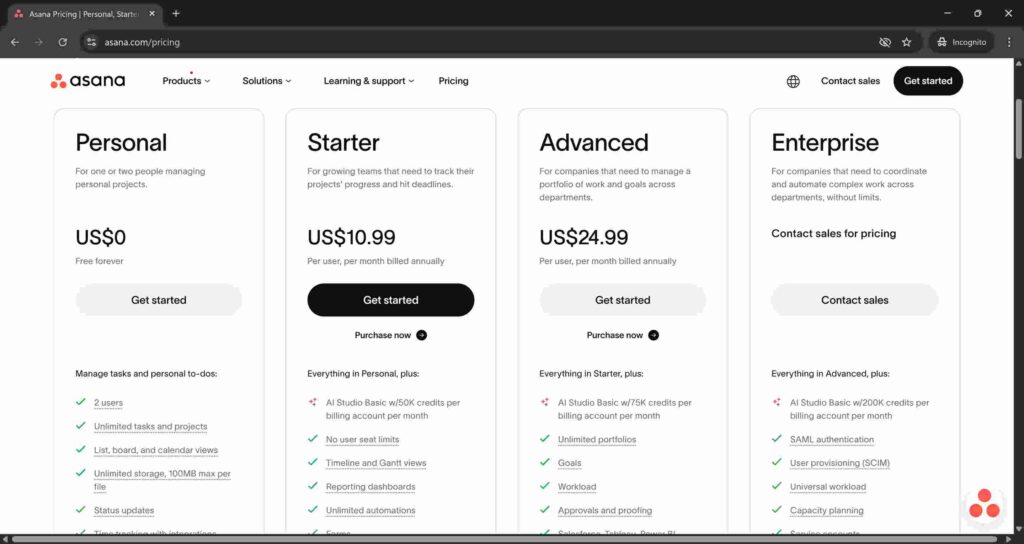
Asana is a clean work management platform built for cross-functional teams. Launched out of Facebook in 2008, it has refined its user experience over nearly two decades. In my testing, Asana’s interface is intuitive and visually appealing. Team members could start using it productively within hours, not weeks. Asana is best for growing teams moving beyond basic task tracking.
Marketing teams, operations teams, and cross-functional product groups consistently rate Asana highest for day-to-day usability. The free tier supports up to 2 users, making it accessible for small teams to test before committing.
What I Liked
- Extremely clean, intuitive interface that doesn’t overwhelm new users
- Clear task ownership and project visibility across departments
- Multiple views: list, board, timeline, and calendar
- Strong integrations with Slack, Zoom, Google Drive, and 200+ other apps
What I Didn’t Like
- Free plan only supports 2 users
- Advanced features like custom fields and reporting require paid tiers at $10.99/user/month
- Less feature-dense than ClickUp for power users
Who Should Avoid It
- Teams that need a true all-in-one platform with native docs and time tracking.
Verdict
Asana is the best productivity software for teams that prioritize clean design and fast onboarding over raw feature count. If your team needs to start being productive immediately without a steep learning curve, pick Asana. Try the free version at asana.com.
Score: 9.2/10
3. Monday.com – Best for Visual Workflows
What I Found
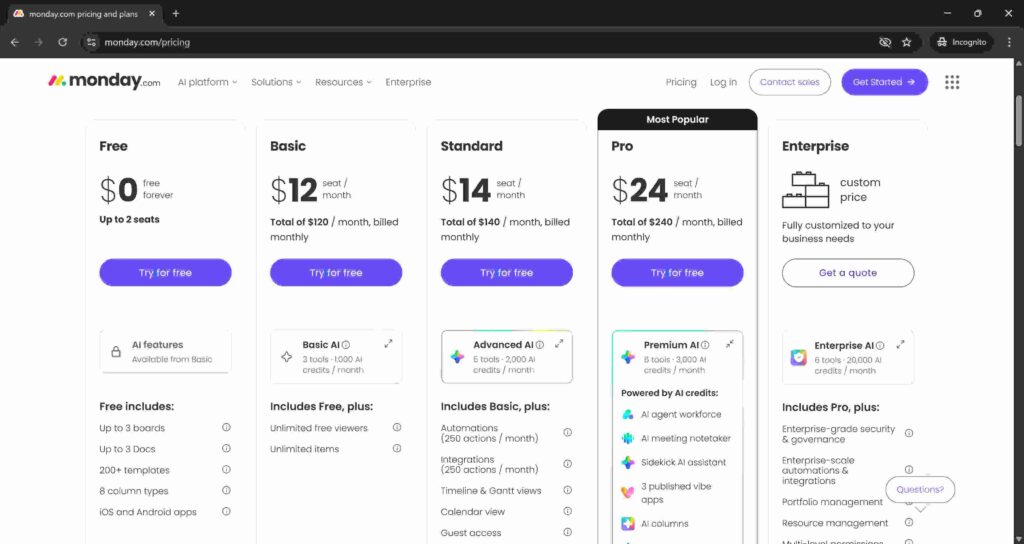
Monday.com is a highly customizable work management platform that shines with its visual interface. It offers multiple views (Kanban, Gantt, calendar, timeline) and extensive color-coding options that make project status immediately obvious.
If your team’s work involves complex workflows that benefit from visual representation — like marketing campaign tracking or product development — Monday.com provides excellent flexibility.
What I Liked
- Highly visual and colorful interface makes project status tracking intuitive
- Extremely customizable dashboards and workflows
- No-code automation builder for streamlining repetitive tasks
- Strong reporting and analytics features
What I Didn’t Like
- More expensive than competitors at $12/seat/month for the Standard plan
- Can become complex to manage at scale
- Free tier is very limited (2 users, basic features only)
Who Should Avoid It
- Budget-conscious teams who don’t need heavy visual customization.
Verdict
Monday.com is the best visual productivity software for teams that need color-coded, highly visual project tracking. It’s pricey but powerful for the right use cases. Explore it at monday.com.
Score: 9.1/10
4. Slack – Best Team Communication

What I Found
Slack remains the standard for team messaging in 2026. It organizes conversations into channels by project, topic, or team, which keeps discussions searchable and contextual. Threaded replies prevent channels from becoming noise, and Slack AI can now summarise long threads so you can catch up on hours of conversation in seconds — a critical feature for teams spanning multiple time zones.
With integrations to thousands of apps, Slack sits at the center of most team communication stacks. For teams that rely on real-time and async communication, Slack is the backbone. For more on AI-powered communication automation, check out our guide to best AI email assistant tools.
What I Liked
- Channel-based organization keeps conversations tidy and searchable
- AI thread summaries save hours of catching up
- Integrations with thousands of apps connect to everything else you use
- Huddles for instant voice calls are perfect for quick questions
What I Didn’t Like
- Free tier only keeps 90 days of message history
- Can become noisy if channels aren’t well-managed
- Pricing adds up quickly for larger teams ($4.38/user/month for Pro)
Who Should Avoid It
- Small teams on a tight budget might prefer Microsoft Teams (included with Office 365).
Verdict
Slack is the best communication productivity software for most distributed teams. The AI features and integrations make it worth the price. Get started with the free tier at slack.com.
Score: 9.3/10
5. Microsoft Teams – Best for Office 365 Shops

What I Found
Microsoft Teams is best for companies already using Microsoft 365. It bundles chat, video calls, file sharing, and Office apps (Word, Excel, PowerPoint) into one interface. In 2026, Teams with Copilot is arguably the most impactful AI workspace because most enterprises already have Microsoft 365 deployed.
Copilot in Teams can summarize meetings, identify action items, draft follow-ups, surface prior decisions, and pull information from across Outlook, Word, PowerPoint, Excel, OneDrive, SharePoint, and Teams itself. For regulated companies, that matters more than novelty.
What I Liked
- Deep integration with Microsoft 365 (Outlook, Word, Excel, SharePoint)
- Includes a free version with limited features
- Strong compliance and security features for enterprises
- Copilot AI is deeply integrated into the workflow
What I Didn’t Like
- Interface can feel heavy and administratively dense
- Performance can be slow, especially on older machines
- Not as intuitive as Slack for pure messaging
Who Should Avoid It
- Teams not already using Microsoft 365 — the integration benefits don’t apply.
Verdict
Microsoft Teams is the best productivity software for organizations already paying for Microsoft 365. For everyone else, Slack or ClickUp are better options. Available through microsoft.com. For a deeper look at AI-powered assistants, check out our ChatGPT vs Google Gemini comparison.
Score: 9.0/10
6. Notion – Best for Knowledge Management
What I Found
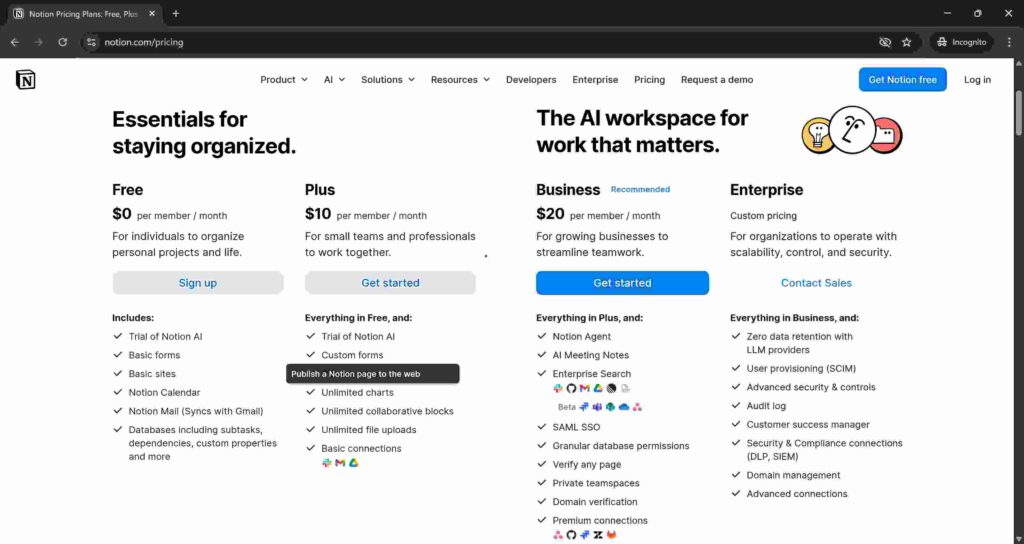
Notion is a flexible, doc-first collaboration platform that blends wikis, docs, and tasks in a collaborative workspace. I used Notion as our team wiki and documentation hub. The ability to build custom databases, knowledge bases, and project trackers in one tool is powerful. Notion is best for flexible, doc-first teams that need to centralize information.
Notion AI can help write, summarize, and find information across your workspace. If your remote team struggles with scattered institutional knowledge, Notion is a game-changer.
What I Liked
- Incredibly flexible — build wikis, project trackers, docs, and more
- Notion AI for writing and summarizing is genuinely helpful
- Collaborative editing works smoothly
- Free tier for individual use is very generous
What I Didn’t Like
- No native offline mode on desktop (mobile has some offline functionality)
- Database features can be confusing for non-technical users
- Pricing adds up for teams ($9/user/month)
Who Should Avoid It
- Teams that need strict structure and templates — Notion’s flexibility can be overwhelming.
Verdict
Notion is the best documentation productivity software for knowledge-heavy teams. If your remote team struggles to find information, Notion will change that. Start with a free account at notion.com.
Score: 8.7/10
7. Clockify – Best Free Time Tracking

What I Found
Clockify is a time tracking tool designed for standardizing timesheets across teams. The free plan supports unlimited users, unlimited projects, and unlimited time entries — no hidden limits. This alone sets it apart from almost every competitor. Clockify standardizes time tracking across teams with flexible logging, making it easy to enforce consistency at scale.
Most productivity stacks are missing a critical layer: measurement. Coordination tools are great, but they organize work. The missing piece is how long you spend working across projects or what that effort costs. Clockify closes that loop by making effort visible, turning a well-organized stack into a genuinely productive one.
What I Liked
- Completely free plan with unlimited users, projects, and time entries
- Easy to use with flexible logging options (timer, manual entry, timesheet)
- Integrates with Asana, Trello, ClickUp, and other major PM tools
- Paid tier starts at just $3.99/user/month for pro features like reporting
What I Didn’t Like
- Basic reporting in the free tier is limited
- No built-in invoicing in the free version
- Mobile app is functional but less polished than desktop
Who Should Avoid It
- Teams that need advanced reporting or invoicing without upgrading to paid plans.
Verdict
Clockify is the best free productivity software for time tracking. No other tool offers unlimited users for free with this many features. For teams that need to measure where time actually goes, start here. Get the free plan at clockify.me.
Score: 8.8/10
8. Trello – Best Simple Visual Task Tracking

What I Found
Trello is a simple, visual task management platform that uses boards, lists, and cards to help teams organize projects and workflows. Its drag-and-drop interface makes it easy to track progress and collaborate. Trello is best for teams that want simple, visual task tracking — no complex setup required.
The free plan supports up to 10 users, making it one of the most generous free tiers. Butler, Trello’s no-code automation tool, handles repetitive tasks like moving cards and assigning members automatically.
What I Liked
- Incredibly easy to learn — new users are productive within minutes
- Free plan supports up to 10 users, one of the most generous free tiers
- Butler automations handle repetitive tasks without coding
- Power-Ups add functionality like calendar view, time tracking, and more
What I Didn’t Like
- Lacks advanced reporting, analytics, and Gantt charts
- Becomes messy with large, complex projects
- Power-Ups are limited in the free tier
Who Should Avoid It
- Teams that need advanced reporting, complex dependencies, or Gantt charts.
Verdict
Trello is the best simple productivity software for visual task tracking. It won’t handle complex projects, but for small teams or simple workflows, it’s perfect. Start with the free plan at trello.com. For more visual collaboration tools, check out our guide to best AI image generators for marketing content.
Score: 8.5/10
Head-to-Head Winners
| Category | Winner |
|---|---|
| Best All-in-One Work Platform | ClickUp |
| Best Clean Design & Fast Onboarding | Asana |
| Best Visual Workflows | Monday.com |
| Best Team Communication | Slack |
| Best for Office 365 Shops | Microsoft Teams |
| Best Knowledge Management | Notion |
| Best Free Time Tracking | Clockify |
Real Limitations I Observed During Testing
ClickUp
The learning curve is real. I spent my first week just figuring out how to organize spaces, folders, and lists. The mobile app also froze twice during a demo with a client. Not ideal.
Asana
The free tier only supports 2 users. If your team has even one extra person, you’re paying. Also, advanced reporting is locked behind the $10.99 tier.
Slack
The 90-day message history limit on the free tier is painful. I lost context for a project I hadn’t looked at in three months. You’ll feel pressure to upgrade quickly.
Microsoft Teams
Teams was sluggish on my 2023 laptop. The interface feels cluttered, and finding old files in SharePoint integration is frustrating. Also, Copilot requires the most expensive license tier.
Notion
The lack of offline mode on desktop is a real problem. I was stuck without wifi on a train and couldn’t access my notes. Notion also has no native time tracking.
Clockify
The free tier reporting is basic. To get detailed analytics on project profitability, you need the paid plan at $3.99. Also, team members can forget to start their timers — no nudge feature.
Trello
For anything beyond basic task tracking, Trello falls short. The lack of native reporting and Gantt charts forced me to export data elsewhere. Power-Ups help, but many are paid add-ons.
FAQ – Productivity Software for Teams
What is the best productivity software for small teams?
For small teams under 10 people, ClickUp offers the most value with its unlimited free plan. Asana is excellent if you prefer clean design over feature density. For very small teams (under 5), Trello’s free tier with 10 users is hard to beat for simple task management.
Is ClickUp better than Asana?
It depends on your priorities. ClickUp is better for teams that want an all-in-one platform with native docs, time tracking, and goals. Asana is better for teams that value clean design and fast onboarding over raw feature count. ClickUp is more affordable ($7 vs $10.99), but has a steeper learning curve.
Does productivity software really improve team efficiency?
Yes, but only if the tool is adopted. The best productivity software removes friction, it doesn’t add it. When teams use centralized tools, task ownership is clear, progress is visible, and context switching is reduced. However, the tool itself won’t fix bad management or unclear priorities.
What free productivity software is available for teams?
Clockify offers completely free time tracking for unlimited users. ClickUp has a free plan with unlimited users and tasks. Trello supports up to 10 users for free. Slack and Microsoft Teams both have free tiers with limited history and features. For documentation, Notion’s free tier is generous for individual use but limited for teams.
What’s the difference between project management and productivity software?
Productivity software is a broader category that includes task management, time tracking, communication, documentation, and automation. Project management software is a subset focused specifically on planning, tracking, and delivering projects with features like Gantt charts, resource allocation, and dependency management. Tools like ClickUp and Asana span both categories.
Which productivity tools have the best AI features in 2026?
ClickUp offers Super Agents, AI Planner, and @Codegen for coding assistance. Slack has AI thread summaries. Microsoft Teams with Copilot provides meeting summaries, action items, and Microsoft Graph integration. Notion AI helps with writing and summarization.
Final Verdict: Which Productivity Software Should You Choose?
After weeks of testing with real projects and real teams, here’s my honest advice:
If you want one tool to replace everything: Get ClickUp. It’s the best productivity software for teams tired of stitching together five different apps. The consolidation payoff is real, and at $7/user/month, it’s the best value in the market. Just budget a week for onboarding.
If you want simplicity and speed: Get Asana. For teams that need clear task ownership and project visibility without the learning curve, Asana is the winner. It’s not as feature-dense as ClickUp, but your team will actually use it from day one.
If you live in Microsoft 365: Get Microsoft Teams with Copilot. The integration with Outlook, Word, Excel, and SharePoint is unmatched. For regulated industries, the governance and compliance features alone justify the cost.
Build a smart productivity stack: Here’s what I’d recommend for most small to medium teams:
- Project and task management: ClickUp (all-in-one) or Asana (simplicity)
- Team communication: Slack or Microsoft Teams
- Time tracking: Clockify (free)
- Knowledge management: Notion
- Video conferencing: Zoom or Google Meet
For more on AI-powered productivity tools that can automate your daily workflow, check out our guide to best AI tools to automate workflow in 2026. And if you’re building a complete tech stack for your small business, don’t miss our best AI tools for startups to grow faster in 2026.
The best tool isn’t the one with the most features. It’s the one your team actually uses. Start with the free tiers, run a pilot with 5-10 people, and upgrade based on real usage, not marketing promises.
For more honest tech reviews and tested buying guides, visit QalTech.com.